
This article may contain affiliate links. We may earn a commission at no additional cost to you; this does not determine our editorial conclusions.
Publishing more content isn’t always the answer.
If your website already has dozens—or even hundreds—of articles, the bigger opportunity may be sitting inside the traffic you’re already getting. Some of those visitors are finding your content through Google, reading what they need, and leaving without subscribing, enquiring, downloading anything, or giving you a way to continue the conversation.
That doesn’t necessarily mean the content is bad. It may be doing its first job perfectly: bringing the right people to your website.
The problem is what happens next.
A useful article can attract thousands of visitors and still generate almost no leads if there’s no logical next step. A generic “Contact Us” button at the bottom of the page usually isn’t enough, especially when the reader is still researching a problem rather than looking for someone to hire.
Instead of immediately adding another ten articles to your publishing calendar, you can build a simple lead generation system around the content that’s already working.
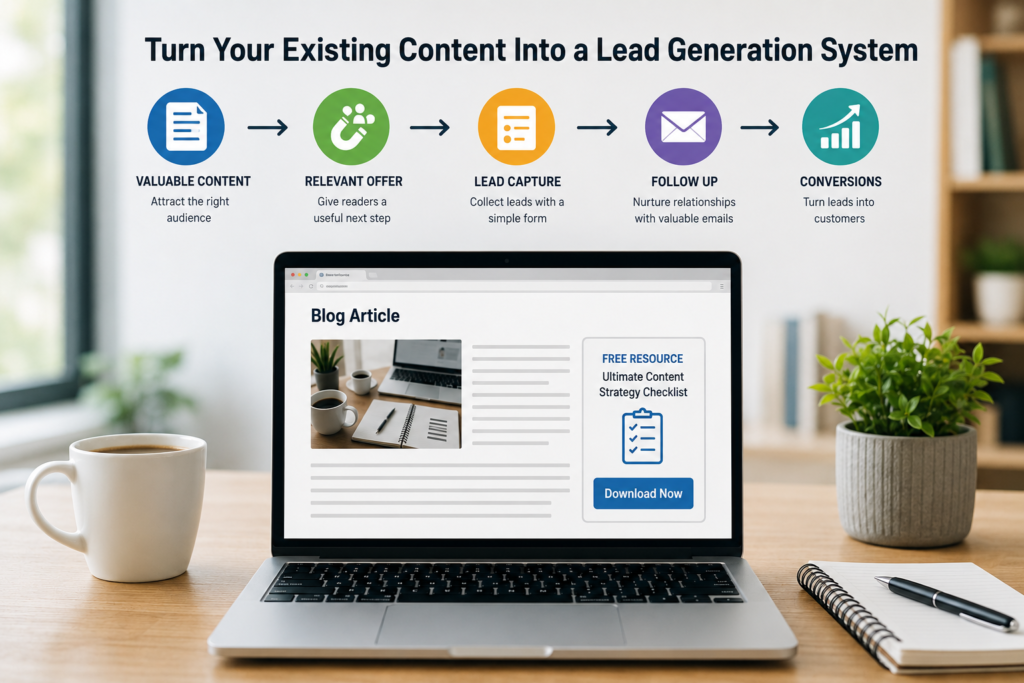
The basic idea looks like this:
Existing content → relevant visitor → useful next step → lead capture → follow-up → conversion
This guide will show you how to build that system without turning every article into a sales page or covering your website with pop-ups.
Quick Takeaways
- Start with existing pages that already attract relevant visitors.
- Don’t put the same call to action on every article.
- Match your offer to what the reader is trying to accomplish.
- Give people a useful reason to provide their email address.
- Connect forms and downloads to a system that can actually follow up with leads.
- Measure leads and conversions, not just pageviews.
- Improve the system before assuming you need more content.
1. Start With the Content That’s Already Bringing People In
Don’t begin by redesigning your entire blog.
Start with a handful of pages that already have something going for them.
These might be articles receiving consistent organic traffic, pages ranking on the first or second page of Google, posts generating a large number of impressions, or evergreen guides that continue attracting visitors months after publication.
Google Search Console is particularly useful here because you can see which pages receive clicks and impressions and which search queries bring people to them.
The goal isn’t simply to find your five highest-traffic pages.
You want pages attracting people who could realistically become customers.
An article receiving 20,000 visits for a broad informational query may be less valuable for lead generation than a highly specific comparison article receiving 2,000 visits from people actively researching a solution.
This is also why reviewing your underperforming content shouldn’t stop at rankings and traffic. An article can perform well in search and still underperform commercially if thousands of visitors leave without taking a meaningful next step.
Look Beyond Traffic
For each promising article, ask:
- What problem brought this visitor here?
- How close are they to making a decision?
- What would they logically want to do next?
- Do we currently give them that option?
- Is there a way for an interested reader to continue the relationship?
That last question matters.
If someone reaches the end of a genuinely useful 2,000-word guide and their only options are to return to Google or click a generic “Contact” link, you’re leaving a lot of the work your content has already done unfinished.
2. Understand Why Someone Is Reading Each Article
This is where many content-to-lead strategies go wrong.
A business creates one lead magnet—perhaps an ebook, free consultation, or newsletter—and promotes it across every article.
But the same offer won’t make sense to every visitor.
Someone reading “What Is Email Marketing?” is probably at a different stage from someone reading “Mailchimp vs HubSpot for Small Businesses.”
The first person may still be learning.
The second is comparing solutions.
Putting “Book a Sales Demo” halfway through the beginner’s guide may be far too aggressive. Offering a generic beginner’s ebook to someone comparing software may be equally unhelpful.
Your next step needs to reflect the reader’s current intent.
That’s why matching content to search intent matters beyond SEO. Search intent can also tell you what kind of conversion opportunity makes sense once someone arrives.
Google’s own people-first content guidance reinforces the broader principle: content should help visitors achieve the goal that brought them to the page rather than being created primarily to attract search traffic.
Match the Next Step to the Reader
Think about the natural progression from the article.
A visitor reading a beginner’s educational guide might appreciate a checklist, template, newsletter, or more detailed guide.
Someone reading a comparison article may be ready for a pricing calculator, free trial, product comparison, consultation, or buying guide.
A visitor reading a detailed problem-solving article may want a template or tool that helps them actually implement what they’ve just learned.
The question isn’t:
“What can we get this visitor to sign up for?”
It’s:
“What would genuinely help this visitor take the next step?”
That small change in thinking makes lead generation feel much less like interruption and much more like part of the content itself.
3. Give Readers a Reason to Become a Lead
“Join our newsletter” isn’t always a particularly compelling offer.
You’re essentially asking someone to give you access to their inbox in exchange for unspecified emails at some point in the future.
There are situations where that works, especially when a publication already has a loyal audience. But businesses trying to generate leads from search traffic usually need to offer something more concrete.
The easiest place to start is with the article itself.
Ask what the reader might need after consuming the content.
If you’ve published an article explaining how to audit a website, offer a website audit checklist.
If the article explains how to plan a content calendar, offer a downloadable content calendar template.
If you’re teaching readers how to compare marketing platforms, a comparison worksheet could help them evaluate their shortlist.
If you’re explaining a complicated process, turn the process into a one-page reference sheet.
You don’t necessarily need a 40-page ebook.
In many cases, a simple resource that saves someone 20 minutes of work is more useful than another long document they may never read.
4. Build a Conversion Path Around the Article
Once you have a relevant offer, think about how someone moves from reading the article to receiving it.
Keep this simple.
For many websites, the conversion path only needs:
Article → CTA → form → confirmation → follow-up
You don’t necessarily need a complicated funnel with 15 automated steps.
The CTA tells the visitor what they’ll receive. The form collects only the information you genuinely need. The confirmation page or email delivers what you promised. The follow-up continues the conversation when appropriate.
This is where your wider content marketing strategy becomes important. If lead generation is one of your goals, the conversion path should be considered when planning content—not added as an afterthought once the article is published.
Don’t Ask for Too Much Information
Every additional field creates another decision for the visitor.
If someone is downloading a simple checklist, do you really need their phone number, company size, job title, industry, country, annual revenue, and number of employees?
Probably not.
For a basic resource, a name and email address may be enough.
More detailed information can make sense later when someone requests a consultation, quote, assessment, or another higher-intent offer.
The form should reflect the value of what you’re offering.
5. Put New Leads Somewhere Useful
Capturing an email address isn’t the end of the system.
It’s the beginning.
If form submissions simply arrive in someone’s inbox and stay there, you’ve created a collection mechanism rather than a lead generation process.
At minimum, you should know:
Who converted?
Which content brought them in?
What did they request?
What happens next?
This is where a CRM becomes useful.
For example, HubSpot can connect forms and contact records so a business can keep lead information organized and use that data for subsequent marketing or sales activity. But the important part isn’t choosing one particular platform.
It’s making sure the information you’ve collected actually goes somewhere your team can use it.
A simple system that’s consistently maintained is far more valuable than an elaborate automation setup nobody understands.
And that leads to the next part of the process: what you do after someone becomes a lead.
6. Follow Up Based on Why Someone Became a Lead
Getting someone’s email address doesn’t necessarily mean they’re ready to buy something.
Someone who downloads a beginner’s SEO checklist has shown interest in SEO, but they may still be researching the problem. Sending them a sales pitch the next morning is a big jump from the reason they originally signed up.
A more natural follow-up starts with what they asked for. Deliver the resource, help them get something useful from it, and then continue with information related to the same problem. If they downloaded an email deliverability checklist, for example, the next email could explain a common deliverability mistake or point them toward another useful resource on the subject.
Someone requesting a consultation, quote, or demo is different. They’ve taken a much stronger action, so a direct response from your team makes sense.
This is one reason it’s useful to know which article and offer generated each lead. A CRM such as HubSpot can keep form submissions, contact information, and subsequent activity together, but the principle applies regardless of which platform you use.
The aim isn’t to build the most complicated automation possible. It’s simply to avoid collecting leads and then treating every person exactly the same.
7. Make the CTA, Landing Page, and Form Feel Like One Journey
A reader doesn’t think of your CTA, landing page, and form as three separate marketing assets. To them, it’s one journey, and each step should make sense based on what came before it.
Imagine someone is reading an article about planning a content calendar. Just after you’ve explained how to organize three months of topics, you offer them a free 90-day content calendar template. That’s a natural next step because it helps them put what they’ve just learned into practice.
But if they click the button and arrive on a landing page saying “Transform Your Marketing Today,” you’ve suddenly broken that connection. The visitor was thinking about a content calendar, and now they’re looking at a vague marketing message and wondering whether they’re even on the right page.
The landing page doesn’t need to be complicated. It should immediately confirm what the visitor is getting, explain why it’s useful, and make it easy to access.
The same applies to the form. Asking for a name and email address in exchange for a useful template is reasonable. Asking for a phone number, company size, job title, annual revenue, industry, and number of employees is probably excessive unless you genuinely need that information.
Think of the whole conversion path as:
Article → relevant offer → clear landing page → reasonable form
In most cases, the landing page can simply live on your existing website. There’s no need to create a separate domain for every lead magnet or campaign.
There are exceptions. You might be launching a standalone campaign, event, microsite, or downloadable resource that has its own identity. In that situation, registering a separate domain through a provider such as Namecheap can be useful, particularly if you want a memorable address specifically for the campaign.
But don’t add another domain simply because it feels more professional. If a page such as yourwebsite.com/content-calendar gives visitors everything they need, keeping it on your existing site is usually simpler.
What matters far more is consistency. Someone should be able to move from the article to the offer, landing page, and form without ever wondering:
“How did I end up here?”
When every step continues the same conversation, the conversion feels less like a marketing funnel and more like the natural next step for someone who found your content useful.
8. Give Interested Readers Somewhere Else to Go
Not everyone will be ready to provide their email address.
That doesn’t make the visit worthless.
Someone might discover your website through Google, read one article, follow an internal link to another, and leave. A week later they might return through another search. Eventually, after seeing several useful resources from the same site, they may subscribe or enquire.
That journey is much harder when every article is effectively a dead end.
Related content gives readers another option besides converting or leaving. If you’ve just explained how search intent works, for example, an article about analyzing competitor content could be a perfectly sensible next step.
These links don’t all need to point toward sales pages. In fact, forcing every path toward a conversion can make the site less useful.
Sometimes the best next step is simply another article that answers the reader’s next question.
Over time, this creates a more useful content library while giving potential customers several opportunities to become familiar with your business before you’re asking them for anything.
9. Measure Leads, Not Just Traffic
Traffic is easy to get excited about.
An article jumps from 2,000 to 10,000 monthly visits and naturally looks like a success. But if those additional visitors never take another meaningful action, you need more information before deciding how valuable that growth actually is.
Consider two articles:
Article A receives 15,000 visits and generates 20 leads.
Article B receives 3,000 visits and generates 90 leads.
Article A wins the traffic contest. Article B is probably much more interesting from a business perspective.
That doesn’t make traffic irrelevant. Without visitors, there are no potential leads to convert. But once you’re generating consistent traffic, you should start asking what happens after people arrive.
Look at which articles generate CTA clicks, form submissions, enquiries, and qualified leads. Where possible, follow those leads further to see whether certain types of content are associated with actual customers or revenue.
You may discover that a relatively small article targeting a specific commercial problem is worth more to your business than a high-traffic informational article.
Google Analytics can also be configured to measure important user actions as key events, making it easier to look beyond pageviews and understand whether visitors are completing the actions that matter to your business.
You don’t need to track every possible interaction. You need enough information to understand which content attracts useful traffic and which content turns some of that traffic into genuine opportunities.
10. Find the Weakest Part of the System Before Creating More Content
Once everything is connected, you can finally see where the real problem is.
If an article attracts thousands of relevant visitors but almost nobody clicks the CTA, publishing another article probably won’t fix that. The offer may simply be uninteresting or poorly matched to the reader.
If plenty of people click but very few complete the form, look at the landing page and form instead.
If you’re generating lots of leads but very few are relevant to your business, go further back. The problem may be the search intent you’re targeting, the audience the article attracts, or the type of resource you’re offering.
And if one article quietly generates significantly more leads than everything else, study it before rushing to publish something new. Look at the search intent, CTA, offer, landing page, and traffic source. There may be something there you can apply to other existing pages.
This is ultimately why a content lead generation system can be so valuable.
Most content teams instinctively respond to disappointing results by creating more:
More articles, more keywords, more landing pages, more lead magnets.
Sometimes that’s necessary. But sometimes the website already has plenty of useful content and a steady stream of visitors. The missing piece is simply connecting what people are reading with a sensible next step.
Before adding another ten articles to the publishing calendar, find your best existing pages, understand why people visit them, and give those readers somewhere useful to go next.
You may already have much more lead-generation potential than your traffic numbers suggest.
A Simple Way to Audit Your Existing Content for Lead Opportunities
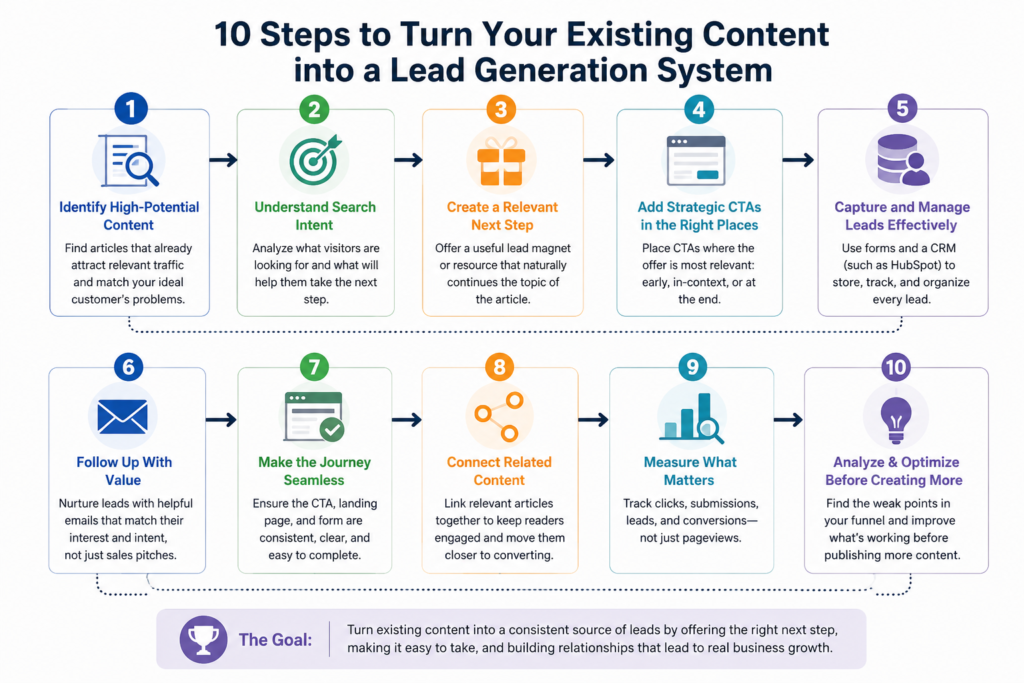
You don’t need to rebuild your entire website to put this into practice. Start with a small group of articles that already receive consistent traffic and work through them one at a time.
For each page, look at the search queries bringing people in and think about what those visitors are trying to accomplish. Then check whether the article gives them a sensible next step.
An article may already be doing a great job of answering the search query but have absolutely nowhere for an interested reader to go afterward. Another might have a CTA, but the offer has very little connection to what the person was reading.
You can usually spot these opportunities by asking a few straightforward questions:
• Does this page attract people who could realistically become customers?
• What is the reader likely trying to accomplish?
• What would be genuinely useful to them after reading the article?
• Is that next step currently available?
• Can we measure whether people take it?
You don’t need to create a unique downloadable resource for every article either. Several closely related articles may be able to use the same checklist, template, email course, assessment, or other resource.
The important part is that the connection makes sense to the reader.
Don’t Turn Every Article Into a Sales Page
Once businesses start thinking about conversions, there’s a temptation to optimize everything.
Suddenly there are banners at the top of the page, pop-ups after ten seconds, sticky buttons at the bottom, forms halfway through the article, and another sales pitch before the conclusion.
You may generate more CTA visibility, but you can also make the content considerably less pleasant to read.
Some articles are naturally much closer to a buying decision than others. A software comparison, pricing guide, or article solving a specific business problem may have an obvious commercial next step. A broad educational article may be much further from that point.
That’s fine.
Your content doesn’t have to convert every visitor immediately to be valuable. Some pages introduce people to your website. Others help them understand a problem. Others attract visitors who are actively comparing solutions.
A good content marketing strategy recognizes those different roles instead of expecting every article to produce the same result.
Lead generation should support the usefulness of the content, not overwhelm it.
Frequently Asked Questions
Can blog content really generate leads?
Yes, particularly when the content attracts an audience relevant to the business and provides a logical next step. Traffic alone doesn’t create leads. Visitors need a reason to continue the relationship, whether that’s downloading a useful resource, subscribing, requesting information, starting a trial, or contacting the business.
Do I need a lead magnet for every blog post?
No. Creating a different lead magnet for every article can quickly become difficult to maintain. One useful resource can often support several articles covering closely related problems. Some pages may not need a lead magnet at all.
What type of content is best for generating leads?
There isn’t one format that always performs best. Content addressing a specific problem, comparison, decision, or use case often attracts visitors with clearer intent, but informational content can also generate leads when the offer naturally continues what the reader is trying to accomplish.
How many CTAs should a blog post have?
There’s no ideal number that applies to every article. A long guide might have a contextual CTA within the content and another near the end, while a shorter article may only need one. Relevance and placement matter more than filling the page with buttons.
Should I send blog visitors directly to a contact form?
Sometimes, particularly when the article attracts people with strong commercial intent. For earlier-stage visitors, a smaller next step such as a checklist, template, newsletter, assessment, or useful resource may feel more appropriate than asking them to contact sales immediately.
Do I need a CRM to generate leads from content?
Not necessarily when you’re just starting, but managing leads manually becomes harder as volume increases. A CRM can help keep contact information, lead sources, interactions, and follow-up organized. The important thing is having a reliable process for what happens after someone submits a form.
Should I publish more content or optimize what I already have?
Look at your existing performance before deciding. If you have relevant pages receiving traffic but generating few meaningful actions, improving those pages and their conversion paths may be the better opportunity. If important topics or search intents aren’t covered at all, new content may still be necessary.
Final Thoughts
Publishing regularly is important, but publishing more isn’t the only way to get more from content marketing.
If you’ve been creating articles for a while, there’s a good chance some of them already attract exactly the kind of people your business wants to reach. The problem may simply be that those visitors read the article, get their answer, and leave.
That’s worth fixing before automatically adding more content.
Start with a few pages that already receive relevant traffic. Work out why people are finding them and what they would realistically want to do next. Then make that next step easy, whether it’s downloading something useful, reading another article, joining your email list, trying a product, or contacting your business.
Connect those actions to a simple system for capturing and following up with interested visitors, and measure which pages actually contribute to leads rather than judging everything by traffic.
You don’t need a huge marketing stack or an elaborate funnel to make this work.
You need useful content, the right audience, a relevant next step, and a reliable way to continue the relationship after someone takes it.
For many established blogs, that’s a much better place to start than simply asking:
“What should we publish next?”

We research and organize marketing software around practical use cases. Product claims are included only when supported by available sources.
Read our editorial policy →Related guides

Black Friday Tracking Blind Spots: How Cookie Consent Affects Marketing Data and Attribution
Black Friday tracking blind spots can make campaign performance harder to interpret at exactly the time marketers need reliable data most. Ecommerce brands may see orders and leads increasing while analytics, advertising platforms, and other marketing systems provide an incomplete picture of which campaigns actually influenced those conversions. That doesn’t necessarily mean something is broken. […]
Meta Box vs ACF: Which WordPress Custom Fields Plugin Is Better in 2026?
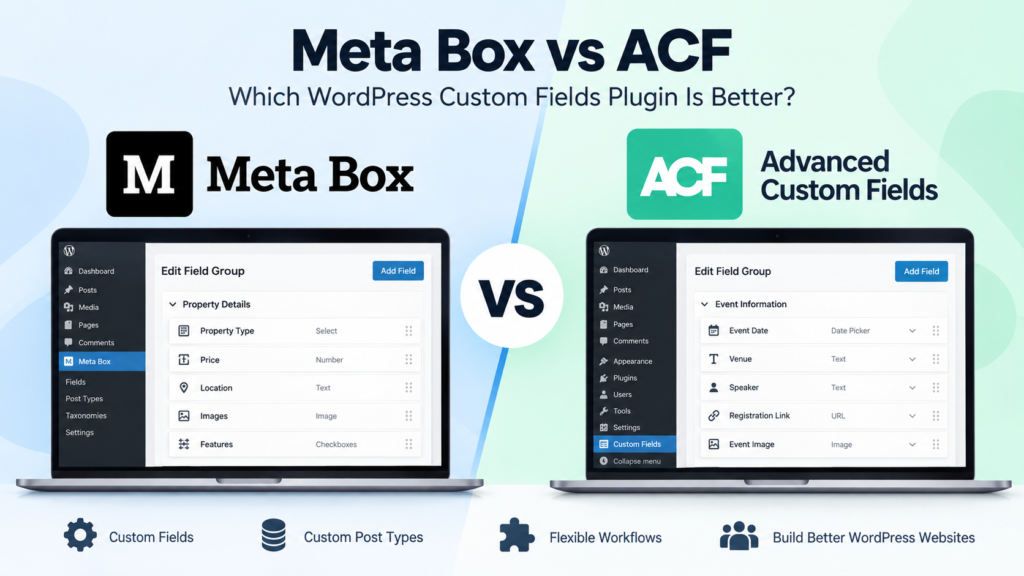
Meta Box vs ACF is a common comparison when a WordPress website starts needing more flexibility than the standard post and page editor provides. Both plugins let you create custom fields, organize structured information, and build more dynamic WordPress websites without forcing everything into the main content editor. The differences become more important as the […]
Kinsta vs WP Engine: Which Managed WordPress Hosting Is Better in 2026?
Kinsta vs WP Engine is a comparison you’re likely to come across when looking for managed WordPress hosting. Both take care of much of the technical work that comes with running WordPress, including performance optimization, security, backups, updates and staging environments. The difference is less about whether either platform can host a WordPress site and […]