

This article may contain affiliate links. We may earn a commission at no additional cost to you; this does not determine our editorial conclusions.
An AI-assisted video can look convincing while showing a product doing something it cannot do. For a small marketing team, the final review should therefore cover more than visual polish. It should establish what the audience will believe after watching and whether that belief is supported.
Start with one viewer decision
Write down what the video should help someone understand: the problem a service solves, the steps in a workflow, or the difference between two approaches. A thirty-second introduction cannot also be a complete demonstration, pricing explanation and customer success story. Choose one job and remove scenes that do not support it.
Separate demonstration from illustration
Use a genuine recording when the audience needs to see a real interface or feature. If a generated scene is only an illustration, make that clear where confusion is likely. Do not use an invented dashboard, customer quote or before-and-after result as evidence of performance.
Imagine a hypothetical software company explaining document approval. A generic animated document moving between two people could illustrate the concept. A generated screen showing an “instant compliance approval” feature would make a much more specific product claim. That claim needs verification, not just an attractive render.
Review claims and permissions
- Can the product owner verify every named feature?
- Does each performance claim have an identifiable source and necessary limitations?
- Do you have permission to use the people, voices, logos, music and customer material?
- Have you checked the current terms for the particular assets and generation service?
- Does the caption or voiceover imply a testimonial that never happened?
Do not upload confidential customer material to a generation tool without an approved data-handling basis. A tool’s ability to accept an upload does not establish permission to use it.
Watch the export on a phone
Review the actual exported file, not just the editing canvas. Watch once with sound and once without. Check that captions are accurate, product names are spelled correctly, and essential text remains legible. Preview the intended placement so interface overlays do not cover the message. Review any alternative crop separately.
Do not treat automatic captions as a finished accessibility check. Review them against the audio, including meaningful sounds and speaker changes. W3C’s captioning guidance explains why automatically generated captions need an accuracy review.
A final review you can repeat
Use a pass, revise or hold decision for each check. “Hold” means the responsible person still needs evidence; it is not a minor issue to hide in the production notes.
- Message: ask a reviewer what they think the product can do after watching. Compare that answer with the intended message.
- Demonstration: identify every scene that appears to show a real feature. Match it to a current recording or product-owner confirmation.
- Claims: record the source for any number, result or comparison. Keep necessary limitations in the video or its immediate context.
- Assets: record where the footage, voice, music and images came from and the permission checked.
- Export: review the actual file, captions and intended crop on a phone.
- Destination: if the video includes a link or an offer, check that the destination matches the promise.
- Approval: obtain approval for the specific version that will be published.
For example, an unclear caption may need a revised export. An unsupported performance claim should keep the video on hold until the claim is substantiated or removed. Treat these as different problems, even if both are easy to miss in a fast review.
Keep a simple approval record
Record the final filename, purpose, verified claims, rights checks and approving person. Save the approved version so a later edit cannot silently replace it. If the offer or product changes, review the video again before reusing it.
This checklist does not guarantee campaign performance. It provides a repeatable way to catch misleading claims and prevent avoidable production mistakes before a polished draft becomes a public promise.
For a repeatable handoff between the reviewer and publisher, use the campaign card in our content repurposing guide. This checklist is editorial workflow guidance, not a legal assessment or a full accessibility audit.

We research and organize marketing software around practical use cases. Product claims are included only when supported by available sources.
Read our editorial policy →Related guides
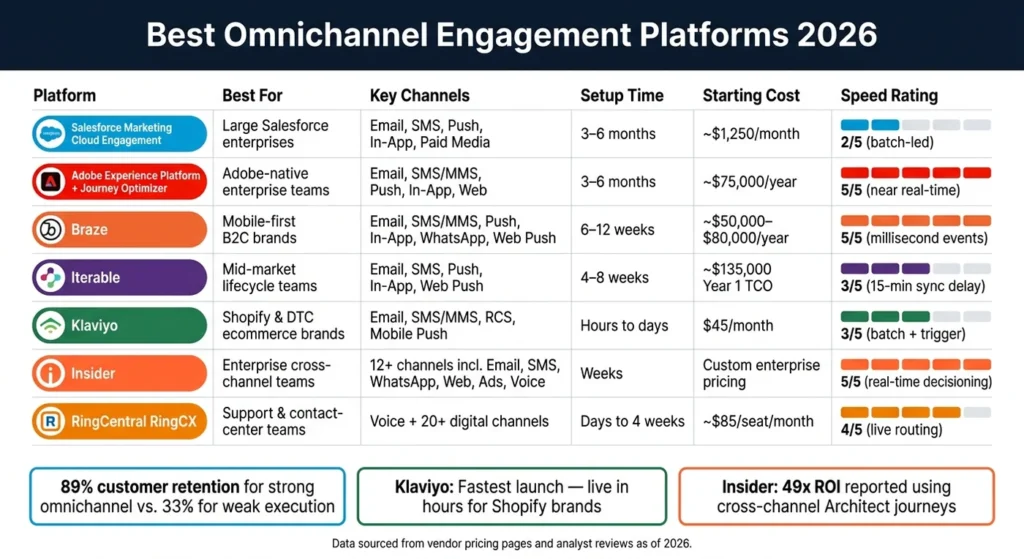
Best Omnichannel Engagement Platforms 2026
If you pick the wrong platform, you can waste months on setup and still miss the channels your team needs or fail to optimize AI based copywriting for SEO to engage them. The shortlist…
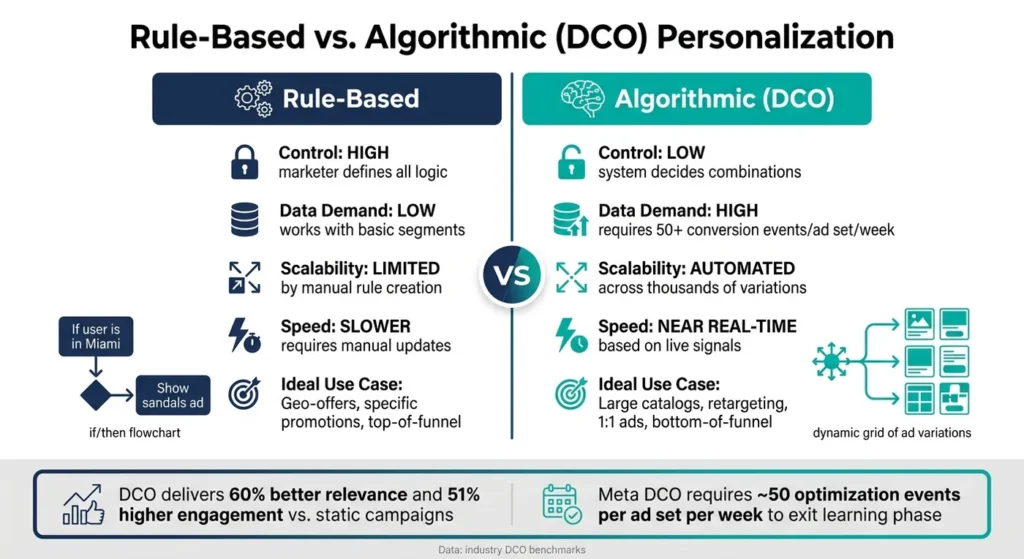
Ultimate Guide to Personalization in Display Ads
Personalized display ads can lift CTR by 34% and cut CPA by 38% when the setup is clean. My take is simple: if I want personalization to work, I need three things in place…
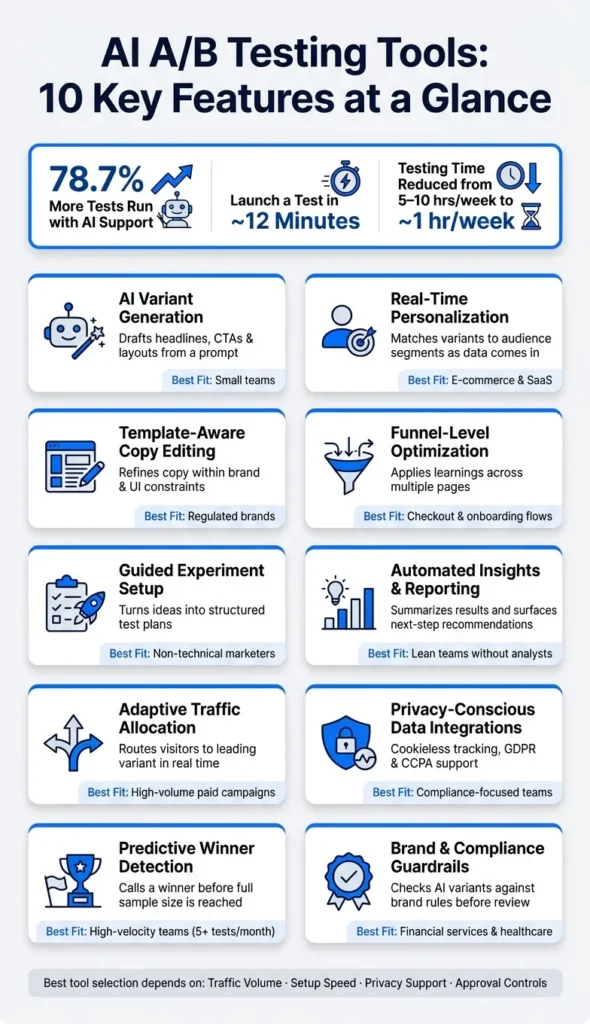
AI A/B Testing Tools: Features, Workflow and Selection Guide
Learn which AI A/B testing features matter, how automated experimentation works and what to compare before choosing a platform.