
This article may contain affiliate links. We may earn a commission at no additional cost to you; this does not determine our editorial conclusions.
Personalized display ads can lift CTR by 34% and cut CPA by 38% when the setup is clean. My take is simple: if I want personalization to work, I need three things in place first – clean first-party data, product-feed and event tracking that match, and ad rules tied to each stage of the funnel.
Here’s the short version:
- Targeting picks the audience. Personalization changes the message.
- Start with the simplest level your data can support. That can be geo, behavior, lifecycle stage, or 1:1 product ads.
- Use rule-based logic for small, controlled tests. Use DCO when I have enough conversion volume and a solid product feed.
- Map ads to funnel stage.
- Awareness: context
- Consideration: browsing behavior
- Conversion: cart data
- Retention: purchase history
- Keep feeds and event IDs clean. If
product_idand feediddo not match, the ad setup breaks. - Use buyer exclusions fast. Stop retargeting buyers for 24–48 hours after purchase.
- Watch the right numbers. Feed Match Rate should stay above 90%, and frequency above about 3 impressions per day can point to ad fatigue.
- Measure lift, not just clicks. A holdout group shows whether personalization changed results.
What matters most is not making more ad versions. It is showing the right product, offer, or message at the right moment without wasting spend, showing stale prices, or hitting the same shopper too often.
If I had to boil the whole article down to one line, it would be this: personalization works when data, ad logic, privacy setup, and measurement all line up.
Core Concepts: Data, Segments, and Dynamic Creative
The Main Data Inputs Behind Personalized Display Ads
Personalized display ads depend on three main inputs: first-party data, contextual signals, and real-time behavioral events.
First-party data comes from your CRM, purchase history, loyalty tiers, and website analytics. In plain English, it’s the data you collect straight from your customers. Contextual signals include page content, device type, approximate location, time of day, and local weather. As third-party cookies fade, these signals still give you a solid way to tailor ads.
Real-time behavior shows intent as it happens. Three events matter most:
- ViewContent shows interest
- AddToCart shows intent
- Purchase ends retargeting
Together, the product feed, tracking pixel, and dynamic logic power personalized campaigns.
Clean product feeds are the foundation of dynamic advertising.
You should also exclude recent buyers from retargeting for 24–48 hours. That cuts wasted spend and avoids annoying people who just checked out.
Levels of Personalization: From Geo-Based Messaging to One-to-One Ads
Not every campaign needs deep personalization. The smart move is to match the ad setup to the data you can count on. Once you know what data you have, use the lightest level that does the job well.
| Level | Type | What It Does | Example |
|---|---|---|---|
| Level 1 | Contextual / Geo-based | Adjusts messaging based on location, weather, device, or time of day | A city-specific or weather-based offer |
| Level 2 | Behavioral | Responds to browsing history or category interest | A shoe retailer retargets users who viewed running shoes |
| Level 3 | Lifecycle | Matches the customer’s stage in the journey | New visitors see a welcome offer; returning buyers see a loyalty reward |
| Level 4 | 1:1 Dynamic | Assembles personalized creative from user intent and product data | A cart reminder showing the exact item left behind with dynamic pricing |
Start at the lowest level your data supports.
Rule-Based vs. Algorithmic Personalization
There are two main ways to run personalization: rule-based logic and DCO. The difference comes down to control, scale, and how much data you have.
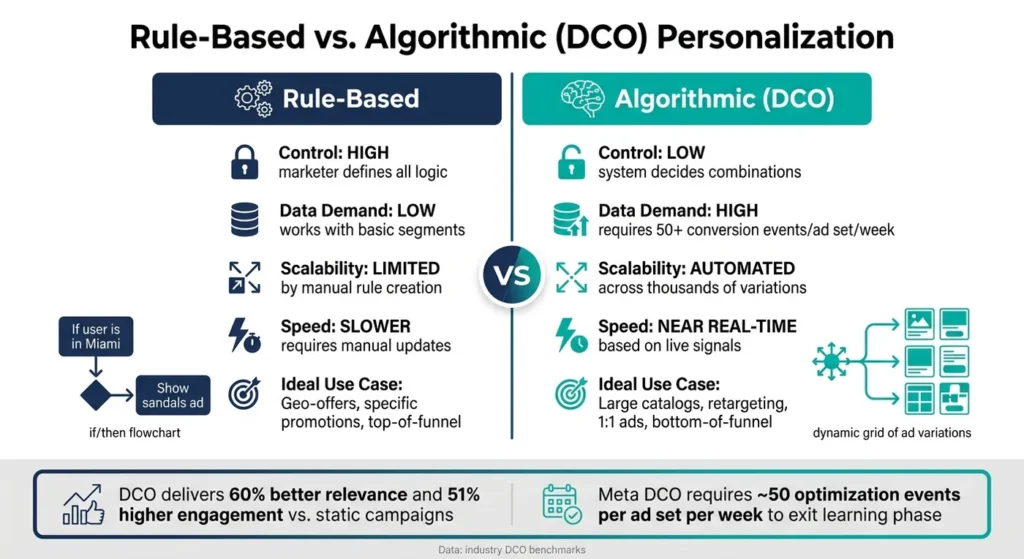
Rule-based personalization uses direct if/then logic. For example: “if the user is in Miami, show the sandals ad.” You set every rule by hand. That gives you full control and makes results easier to predict. The tradeoff is scale. Once you get beyond a small set of ad variations, manual rules become a headache.
Algorithmic personalization, often called DCO, uses machine learning to test and assemble ad combinations on its own. It can handle thousands of variations without manual work. But there’s a catch: it needs enough data to learn. Meta’s delivery model, for example, usually needs 50 optimization events per ad set per week before performance settles down. DCO makes the most sense when your product feeds and conversion signals are strong enough to support automated ad selection.
| Feature | Rule-Based | Algorithmic (DCO) |
|---|---|---|
| Control | High – marketer defines all logic | Low – system decides combinations |
| Data Demand | Low – works with basic segments | High – requires conversion signal volume |
| Scalability | Limited by manual rule creation | Automated across thousands of variations |
| Speed | Slower – requires manual updates | Near real-time based on live signals |
| Ideal Use Case | Geo-offers, specific promotions | Large catalogs, retargeting, 1:1 ads |
A simple way to think about it: use rule-based logic when you want tight message control at the top of the funnel, and use DCO for bottom-of-funnel retargeting where speed and variation matter more. Agencies using DCO have reported 60% better relevance and 51% higher engagement than static campaigns.
None of this works well without the basics in place. Tracking, consent, and feed quality have to be set up first.
With the data logic mapped out, the next piece is privacy, tagging, and workflow. That’s what turns these rules into something your team can actually run at scale.
sbb-itb-645e3f7
Dynamic Creative Optimization (DCO) & Programmatic Display Advertising Overview – Pete Kluge, Adobe
Setup Requirements: Privacy, Tech Stack, and Team Workflow
Once your personalization rules are in place, the next step is the part that makes everything run: tracking, feed quality, and clear ownership.
Tracking, Consent, and Data Hygiene Before Launch
Before you spend $1 on personalized display ads, make sure your tracking works. If even one product ID doesn’t match, the ad-to-product match breaks.
Browser pixels also miss conversion signals. That’s why server-side tracking through CAPI matters. It improves signal quality and cuts down on lost conversion events.
There are privacy limits too. Google restricts personalization for minors and for sensitive categories like healthcare and some financial products. If your team is small, first-party CRM data and contextual signals are the safest place to start.
Clean data matters just as much as consent. Standardize product titles with this format: [Brand] [Product Name] [Key Attribute]. And if you’re running flash sales or dynamic pricing, set feed refresh intervals to 6 hours or less.
Why does that matter? Because stale data leads to ads for out-of-stock items or the wrong price. That’s one of the fastest ways to burn budget and annoy shoppers.
Once your IDs and event tracking are clean, the platform can connect user behavior to the right product data.
The Basic Tech Stack for Personalized Display Campaigns
A personalized display setup has three parts: feed, template, and rules.
The feed sits inside a feed management tool. That usually means Google Merchant Center for Google campaigns or Meta Commerce Manager for Meta. It stores product IDs, titles, images, prices, and availability.
Your tracking pixel and CAPI tie user actions back to those product IDs. So when someone views a product or adds it to cart, the platform knows exactly which item it was. From there, the platform pulls feed data into a prebuilt template in real time.
CRM/CDP data adds another layer. It brings in segments, loyalty status, and purchase history. Then the analytics layer closes the loop by tracking feed match rates, frequency, and ROAS, so you can see what’s working and what’s not.
For smaller teams, responsive templates can take a lot of pressure off production. One design can auto-generate the ad sizes you need, like 300×250 and 728×90, along with others. That removes a major bottleneck.
Who Does What in a Personalization Workflow
Personalization often falls apart for a simple reason: no one owns feed accuracy, CAPI mapping, or segment logic. So the last setup requirement is clear responsibility at each step.
| Role | Primary Responsibility |
|---|---|
| Strategist | Defines segments and rules |
| Media Buyer | Manages bids and learning phase |
| Designer | Builds modular templates |
| Marketing Ops | Owns feed and CAPI mapping |
| Analyst | Tracks match rate, frequency, and ROAS |
Strategy and Execution: How to Build Personalized Display Campaigns
Match Personalization to the Customer Journey
Once your tracking and product feeds are set up, connect each audience segment to the message it should see.
The idea is simple: match the message to the buyer’s stage. Someone who just found your brand needs a different ad than someone who left a product in their cart.
| Funnel Stage | Message Type | Creative/Data Input |
|---|---|---|
| Awareness | Educational / Brand Story | Contextual signals, location, demographics |
| Consideration | Product Category / Benefits | Browsing behavior, category views |
| Conversion | Specific Product / Offer | Cart abandonment data, dynamic pricing |
| Retention | Win-back / Cross-sell | Purchase history, loyalty status, new arrivals |
A good rule of thumb:
- Use context for awareness
- Use behavior for consideration
- Use cart data for conversion
- Use purchase history for retention
From there, assign one ad angle per stage and build your templates around it. That keeps the campaign focused and makes testing much easier.
Build Segments and Modular Ad Templates That Scale
Start with cart abandoners, repeat buyers, and category browsers. These groups usually show strong intent, which makes them easier to test before you expand.
For ad creative, use a modular template. Keep one fixed brand shell, then swap in product images, headlines, prices, and descriptions. In plain English, you build the frame once and plug in different product details as needed. That cuts down manual design work and helps you move faster.
Stick to common U.S. display sizes: 300×250 (Medium Rectangle), 728×90 (Leaderboard), and 300×600 (Half Page). One responsive template can produce all three sizes, which speeds up production across standard placements.
Keep each campaign to 16–32 variations so you don’t spread spend too thin and lose a clean read on performance.
After the template is ready, launch a small test set before opening up delivery.
Start Small, Monitor Daily, and Expand Based on Results
Begin with 2–3 segments and 2 creative angles. Before you scale, check pixel events, feed match rate, and rendering. If any of those are off, the rest of the campaign data gets messy fast.
During the first 7–14 days, avoid changing bids or audiences. Automation needs 7–14 days to settle, and constant edits during the learning phase can slow useful data.
For day-to-day monitoring, watch:
- Frequency
- ROAS
- CPA
- Feed match rate
Once frequency gets above roughly 3 impressions per day, you’re often looking at ad fatigue or overexposure. Exclude buyers as soon as conversion events fire, and keep purchaser exclusion audiences active so recent customers stop seeing retargeting ads.
Each week, review results at the segment level using the same KPI set across all segments. That gives you a clean way to spot winners fast. Use Google’s “Best”, “Good”, and “Low” asset ratings to swap out weak headlines or images, and refresh borders, fonts, and colors every 4–6 weeks for B2C campaigns to fight banner blindness.
Measurement, Common Problems, and Next Steps
How to Measure Whether Personalization Is Working
After launch, judge performance by lift, not clicks.
CTR can point you in the right direction, but it doesn’t prove that personalization caused better results. To measure incremental lift, compare a personalized group against a holdout group. The gap in conversions or revenue is your true lift. Without a control group, you’re looking at correlation, not causation.
Your KPIs should also match the stage of the funnel:
- Awareness: CTR and engagement
- Consideration: Feed Match Rate, which should stay above 90%, and frequency
- Conversion: ROAS, CPA, and conversion rate; dynamic retargeting ROAS often falls between 400% and 800%
- Retention: Repeat engagement and customer lifetime value
If you’re using Meta or Google automated bidding, keep an eye on Event Match Quality (EMQ). Accounts with scores above 7.0 often leave the learning phase faster and hit stable ROAS within two weeks.
When lift looks weak, start with the basics: check the feed, tracking, creative, and consent setup first.
Common Implementation Problems and How to Fix Them
When performance stalls, the issue usually comes down to data, tracking, creative, or consent.
| Challenge | Solution |
|---|---|
| Incomplete or dirty data | Automate feed refreshes every 6 hours and use Google Merchant Center or Meta Commerce Manager diagnostics to catch broken links, stale prices, and out-of-stock items |
| Low audience match rates | Make sure the product_id in pixel events matches the id field in your feed exactly; enable Enhanced Matching in platform settings |
| Consent restrictions | Use a Consent Management Platform (CMP), prioritize privacy-first contextual targeting, and shift toward server-side tracking via Conversions API |
| Creative fatigue | Refresh ad frames – borders, fonts, and colors – every 4–6 weeks while letting dynamic product content update automatically |
| Operational overhead | Use AI creative automation to generate bulk variations from a single modular template |
| Attribution noise | Measure incrementality and ROAS rather than CTR alone, and use holdout groups plus strong User ID tracking to stitch journeys across devices |
Treat Feed Match Rate below 90% as a data issue, not a bidding issue.
Conclusion: The Simplest Path to Better Personalized Display Ads
Use the same measurement standard across every segment so it’s easy to spot the winners.
Good personalization depends on three things: clean first-party data, modular creative templates that scale without manual rework, and steady measurement against a control group. Scale only what shows incremental lift.
FAQs
How do I know which personalization level to start with?
Start with the basics: audience segmentation, real-time creative updates, and a process that can handle lots of ad variations. If those pieces are in place, begin with just two signal layers, like industry and journey stage.
If you’re new to this, stick with non-dynamic or dynamic display ads before you move into advanced audience targeting or one-to-one personalization. Use A/B testing to fine-tune your messaging and make sure personalization adds actual value.
What setup issues most often break personalized display ads?
The most common issues come down to bad data setup and broken creative configuration.
That usually looks like this:
- inaccurate or poorly structured product feeds
- stale or incorrect pricing
- tracking failures when pixel events, like product IDs, do not match the feed exactly
- untested ad variations or templates
When these issues show up, they can lead to ad rejections, generic fallback ads, or creative that appears broken or blank.
How can I prove personalization is driving real lift?
Focus on performance outcomes, not vanity metrics. Use A/B or multivariate tests to compare personalized ads against static control groups so you can isolate lift.
Track ROAS, CPA, conversion rates, and engagement. If you want a deeper read on what’s working, tag each impression and click with a unique variant ID. That makes it much easier to spot which creative segments drive pipeline and brand search lift.
Related Blog Posts

We research and organize marketing software around practical use cases. Product claims are included only when supported by available sources.
Read our editorial policy →Related guides

How to Outsource Content Creation Without Losing Your Brand Voice
Learning how to outsource content creation can solve one of the biggest problems in content marketing: there is always more content to create than there is time to create it. Blog posts need writing, landing pages need updating, emails need preparing, and social channels need a steady supply of useful material. But handing the work […]

Vista Social vs Metricool: Which Social Media Management Tool Is Better in 2026?
Vista Social vs Metricool is a close comparison because both platforms bring social media scheduling, analytics, content planning, and management into one place, but they approach the job differently. Vista Social puts more emphasis on engagement, team workflows, automation, and managing conversations alongside publishing, while Metricool has a particularly strong focus on planning, analytics, competitor […]
Content Marketing Tools: How to Build the Right Software Stack
Build a practical content marketing software stack for planning, writing, design, distribution and measurement without paying for overlapping tools.