
This article may contain affiliate links. We may earn a commission at no additional cost to you; this does not determine our editorial conclusions.
The short answer: pick the eBook template based on the job it needs to do. If your goal is leads, use a short layout with clear CTA blocks. If your goal is planning, use pages for goals, workflows, calendars, and tracking. If your goal is client or team training, use step-by-step pages, checklists, and screenshots.
Here’s why that matters: 51% of B2B companies use eBooks, and 67% of B2B buyers used them in the last 12 months to research purchases. On top of that, marketers who document their plan are 538% more likely to report success. So I’d judge a template by five things first: goal, reader, page order, brand control, and export type.
Before I pick a template, I’d check:
- Goal: lead generation, planning, onboarding, thought leadership, or authority building
- Reader: busy executives, team members, clients, or solo audience
- Page flow: summary, goals, audience, plan, workflow, calendar, distribution, and SEO best practices
- CTA spots: middle of the eBook, end of sections, or final page
- Brand fit: colors, fonts, charts, screenshots, and white space
- File type: PDF, EPUB, and source files like Google Slides, .PPTX, or .INDD
If I need one rule to follow, it’s this: clear structure beats flashy design.
1. Define the eBook’s Goal Before Picking a Template
Start with the main outcome. Then choose the template that fits that job.
That one decision cuts the list down fast. Most eBooks land in one of five groups: lead generation, planning, onboarding, campaign roadmaps, or authority building. Each one needs a different setup.
A lead magnet works best with a punchy cover and a clear CTA block. A campaign playbook needs worksheets and repeatable workflows. An onboarding guide needs step-by-step help, checklists, and frameworks people can use right away.
If the template doesn’t match the goal, the format starts fighting the content instead of supporting it. So before you judge colors, fonts, or page layouts, use the goal to narrow the format.
Choose a Template Based on the Main Outcome
A long-form template for a simple lead magnet adds friction that the reader doesn’t need. eBooks built for conversions usually follow a Problem/Solution structure. Thought leadership pieces need a serious, authoritative feel. Internal planning docs work best with checklists and fillable sections.
Here’s how the goal lines up with template features:
| eBook Goal | Typical Length | Core Template Features |
|---|---|---|
| Lead Generation | Short-form | Strong cover, clear CTA blocks, scannable layout |
| Planning | Medium-length | Worksheets, workflows, repeatable frameworks |
| Onboarding | Medium to long | Step-by-step guides, checklists, screenshots |
| Thought Leadership | Long-form | Original research, expert quotes, data visuals |
| Authority Building | Long-form | Deep chapters, case studies, professional typography |
Decide Where Call-to-Action Blocks Should Go
CTA placement is a strategy call, not just a design choice.
For a lead generation eBook, a CTA in the middle of the document can point readers to a webinar or case study without breaking the flow. For a customer education guide, a contact block after the conclusion usually works better because the reader has already gone through the material and is ready for the next step.
Once the goal and CTA placement are clear, match the template to the reader next.
sbb-itb-645e3f7
2. Match the Template to the Target Reader
The goal sets the outcome. The reader sets the layout and pace.
A template that works for a busy business reader can feel too packed for a solo creator growing an audience through a newsletter. Reader type has a direct effect on layout density and visual rhythm. That helps narrow your template options before you even look at page flow.
Busy business readers – executives, team members, and clients – usually scan first and read second. They tend to respond well to an executive summary at the start, pull quotes that surface key ideas, and charts or diagrams spread through the book to break up text-heavy pages. For this group, a tight guide that solves one clear problem often works better than a broad document that tries to cover everything.
Templates for Marketing Teams vs. Solo Creators
Marketing teams need room for collaboration and approval steps. Solo creators usually need speed and simple editing.
| Feature | Marketing Team Use | Solo Creator Use |
|---|---|---|
| Editing Needs | Multi-user collaboration, version control, brand kits | Fast, drag-and-drop DIY editing |
| Approval Workflow | Stakeholder comments, legal review, brand compliance | Single-person sign-off, personal voice |
| Core Sections | Case studies, data charts, reporting pages, team bios | Personal story, worksheets, simple CTAs |
| Final Output | Interactive web links or high-res PDF for lead gen | Standard PDF or EPUB for email lists and social sharing |
Adjust Reading Level and Layout for the Audience
Use readable typography, a clear hierarchy, and enough white space so people can scan fast. Icons for recurring elements – like “Pro Tips” or action steps – also help readers build a mental map of the document without much effort.
Text-heavy layouts fit research readers who want depth. Simple layouts help skim readers get to the point faster. Alejandra Mariscalez, Head of Design at Visme Inc., put it plainly:
“Any good font pairing or use of typography, done properly, can set the tone for your overall look and feel and give it a sophisticated edge.”
Match the template’s visual weight to the amount of attention your reader is likely to give it. Once that fit is clear, the next step is to check whether the page order and core sections support that audience.
3. Check the Page Flow and Core Sections
Page flow shapes how fast you can turn a template into a finished eBook. The best way to judge it is simple: match the template to the article’s core promise. The right template should fit the job, the reader, and the way your team works. Start by checking whether the section order lines up with how you want to build the content.
Use a Clear Section Order
Once the goal and reader are set, page flow becomes the main filter. A strong template should move from planning to execution in a logical sequence: Executive Summary → Goals & KPIs → Audience → Content Plan → Workflow → Calendar → Distribution → Measurement.
Each step builds on the one before it.
Look out for missing planning pages or extra graphics that don’t help with planning. A template packed with filler and thin on working frameworks can slow you down and force rewrites before the draft even starts. That matters, because marketers who document their strategy are 538% more likely to report success than those who don’t.
Use that structure as your baseline when you compare templates side by side.
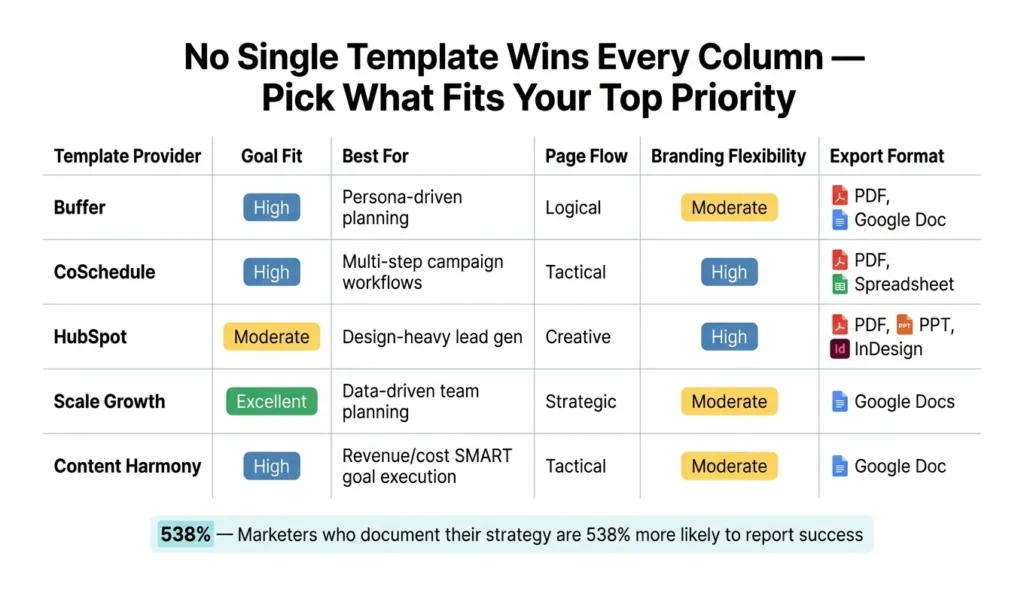
Compare Template Options Side by Side
When you compare templates, focus on the parts that shape editing speed and final use.
| Template Provider | Goal Fit | Best For | Page Flow | Branding Flexibility | CTA Placement Options | Export Format |
|---|---|---|---|---|---|---|
| Buffer | High (focuses on “Why”) | Persona-driven planning | Logical | Moderate | In-line & full page | PDF, Google Doc |
| CoSchedule | High (business objectives) | Multi-step campaign workflows | Tactical | High | End-of-section blocks | PDF, Spreadsheet |
| HubSpot | Moderate (lead gen focus) | Design-heavy lead gen | Creative | High (brand guidelines) | Inline, full page, gated | PDF, PPT, InDesign |
| Scale Growth | Excellent (KPI-driven) | Data-driven team planning | Strategic | Moderate | Section-end blocks | Google Docs |
| Content Harmony | High (revenue/cost focus) | SMART goal execution | Tactical | Moderate | Inline blocks | Google Doc |
No single template wins in every column. A marketing team running lead gen campaigns may lean toward HubSpot’s CTA placement options or CoSchedule’s branding flexibility. A solo creator who wants a fast, structured starting point may prefer one of the simpler, tactical choices in the table.
Choose the option that lines up with your top priorities.
After page flow checks out, verify branding control and export formats.
4. Review Branding, Editing, and Export Requirements
If the page flow works, the next step is simple: make sure the template fits your brand and exports without a mess.
Check Branding Flexibility and Professional Fit
A template that doesn’t fit your brand can eat up a lot of time. Before you commit, see whether it supports global color changes. That way, you can apply your brand palette across every page in one move. Stick with 2–3 primary brand colors to keep the layout clean.
Font hierarchy matters too. You want templates with clear differences between heading, subheading, and body text styles. If everything looks the same, readers have to work harder than they should.
It also helps to choose a template with space for charts, screenshots, and data visuals. Pair that with enough white space so the pages don’t feel cramped or hard to scan.
Once the branding checks out, look at the file types.
Confirm File Types and Export Options
Export format is where a lot of teams hit trouble late in the process. The right format depends on how you plan to use the eBook.
- PDF is the standard for lead magnets. It locks the layout and shows up the same way on any device.
- EPUB works well for mobile reading because the text can reflow for smaller screens.
- Editable source files like .PPTX, .INDD, or Google Slides matter just as much. If you only have the exported PDF, you may have to rebuild the eBook from scratch when it’s time for updates next quarter.
For marketing teams running lead gen campaigns, PDF and editable source files are must-haves. For solo creators sharing through email lists or social, PDF or EPUB will cover most needs.
Conclusion: Pick a Template That Fits the Job, Reader, and Workflow
After you’ve checked the goal, reader, flow, branding, and export, run one last test: make sure the template fits the job you need it to do.
That means it should match your goal, line up with how your reader likes to read, support a clear section flow, give you enough room for brand colors and fonts, and export in the file types your workflow needs.
Clear structure beats flashy design. That’s the rule to use when it’s time to make the final call.
Key Points to Keep in Mind
Use the final checklist to choose a template that’s easy to read, easy to edit, and ready to export. Leave enough white space so your brand colors and fonts don’t feel cramped. Add light mid-chapter prompts, then use a stronger final CTA. Also check that the export options fit your use case: PDF for lead magnets, EPUB for reflowable reading, and source files for future edits.
FAQs
How long should my eBook be?
Marketing eBooks usually run from 12 to 40+ pages. There’s no hard rule, though. What matters is that the eBook covers enough ground to teach the reader something useful without feeling thin or rushed.
In most cases, that means including at least five chapters so the content moves in a clear, logical way.
Aim for enough depth to educate readers, but keep the layout easy to skim and scan. Think short sections, clean formatting, and a structure that helps people find what they need fast.
What pages are essential in a strategy eBook?
Include the parts readers expect in an ebook, and make each one earn its place.
Start with a cover page that spells out the topic, who it’s for, and why it matters. A reader should get the point in seconds. If the cover feels vague, people may bounce before they even begin.
Your introduction should set the stage. Explain the problem, show why it matters now, and give readers a quick look at what they’ll learn. Think of it as a promise: here’s what you’re dealing with, and here’s how this ebook will help.
The body chapters do the heavy lifting. This is where you teach, show examples, and turn ideas into action. Case studies help readers see how the advice works in practice. Frameworks, templates, and playbooks help them apply it to their own work.
A conclusion should tie the main points together and tell readers what to do next. Keep it direct. Sum up the big takeaways, then add clear calls to action, whether that’s booking a demo, signing up for a newsletter, sharing the ebook, or trying a process on their own.
You can also add worksheets or checklists at the end. These aren’t just nice extras. They give readers a way to use what they learned right away, which makes the ebook more useful and more memorable.
Which export format should I choose?
An interactive PDF is often the best pick for marketing eBooks. It works across many devices and lets you add links and other interactive elements, which makes it a strong fit for lead generation, product education, and branded content.
EPUB is another option. But it can be more limited because some devices, including Amazon Kindle, may not support it. The right format comes down to your audience’s devices and what you want the eBook to do from a marketing standpoint.
Related Blog Posts

We research and organize marketing software around practical use cases. Product claims are included only when supported by available sources.
Read our editorial policy →Related guides

How to Outsource Content Creation Without Losing Your Brand Voice
Learning how to outsource content creation can solve one of the biggest problems in content marketing: there is always more content to create than there is time to create it. Blog posts need writing, landing pages need updating, emails need preparing, and social channels need a steady supply of useful material. But handing the work […]

Vista Social vs Metricool: Which Social Media Management Tool Is Better in 2026?
Vista Social vs Metricool is a close comparison because both platforms bring social media scheduling, analytics, content planning, and management into one place, but they approach the job differently. Vista Social puts more emphasis on engagement, team workflows, automation, and managing conversations alongside publishing, while Metricool has a particularly strong focus on planning, analytics, competitor […]
Content Marketing Tools: How to Build the Right Software Stack
Build a practical content marketing software stack for planning, writing, design, distribution and measurement without paying for overlapping tools.