
This article may contain affiliate links. We may earn a commission at no additional cost to you; this does not determine our editorial conclusions.
Aqua Mail is a flexible and feature-rich secure email client designed for users who need full control over multiple email accounts in one place. It supports a wide range of email providers and gives users a clean, customizable interface for managing daily communication. For professionals and everyday users, it offers a balance of simplicity and advanced control through a mobile email productivity tool built for modern workflows.
Unlike basic email apps, Aqua Mail focuses on productivity and personalization. It allows users to manage different inboxes without switching apps, making it easier to stay organized across personal and work emails. This makes it especially useful for users who rely on an IMAP email app experience with flexibility and control over syncing, folders, and message handling.
Aqua Mail is designed for mobile users who want a reliable email client that adapts to their workflow. From custom gestures to folder management and identity switching, it functions as a unified inbox app that improves both speed and efficiency in communication across multiple accounts.
Quick Overview of Aqua Mail
Aqua Mail is built for users who want a centralized and highly customizable email experience on mobile devices. It combines multiple inboxes into one interface, supports major email providers, and gives users strong control over how messages are organized and handled. The app focuses on improving speed, reducing inbox clutter, and making email management more efficient for both personal and professional use.
This scale highlights why tools like Aqua Mail matter, especially for users managing multiple inboxes across work and personal environments.
What is Aqua Mail best for?
Aqua Mail is best for users who need to manage multiple email accounts in one unified inbox while improving organization and reducing app switching. It is designed for users who want a structured, mobile-first email system rather than a basic default email app.
Here’s how Aqua Mail works in practice: it connects different email providers into a single interface, allowing users to read, send, and organize emails without logging in and out of separate accounts. This creates a smoother workflow for users managing both personal and professional communication.
The key benefits of Aqua Mail are flexibility, customization, and multi-account control.
Aqua Mail delivers a unified inbox experience that reduces clutter, improves visibility, and helps users respond faster across all accounts.
Aqua Mail Account & Setup Experience
Aqua Mail makes it simple to connect and manage multiple email accounts in one app. Users can quickly add accounts from providers like Gmail, Yahoo, Outlook, and others with minimal setup steps.
The setup process is designed to be fast and intuitive, allowing users to start sending and receiving emails within minutes. It also supports automatic configuration for most major email providers, reducing technical setup friction.
Aqua Mail allows users to customize account identities, making it easy to switch between personal and professional communication without confusion or overlap.
Key Features of Aqua Mail
Aqua Mail includes several core features designed to make email management more organized, flexible, and efficient for everyday use.
Unified Inbox
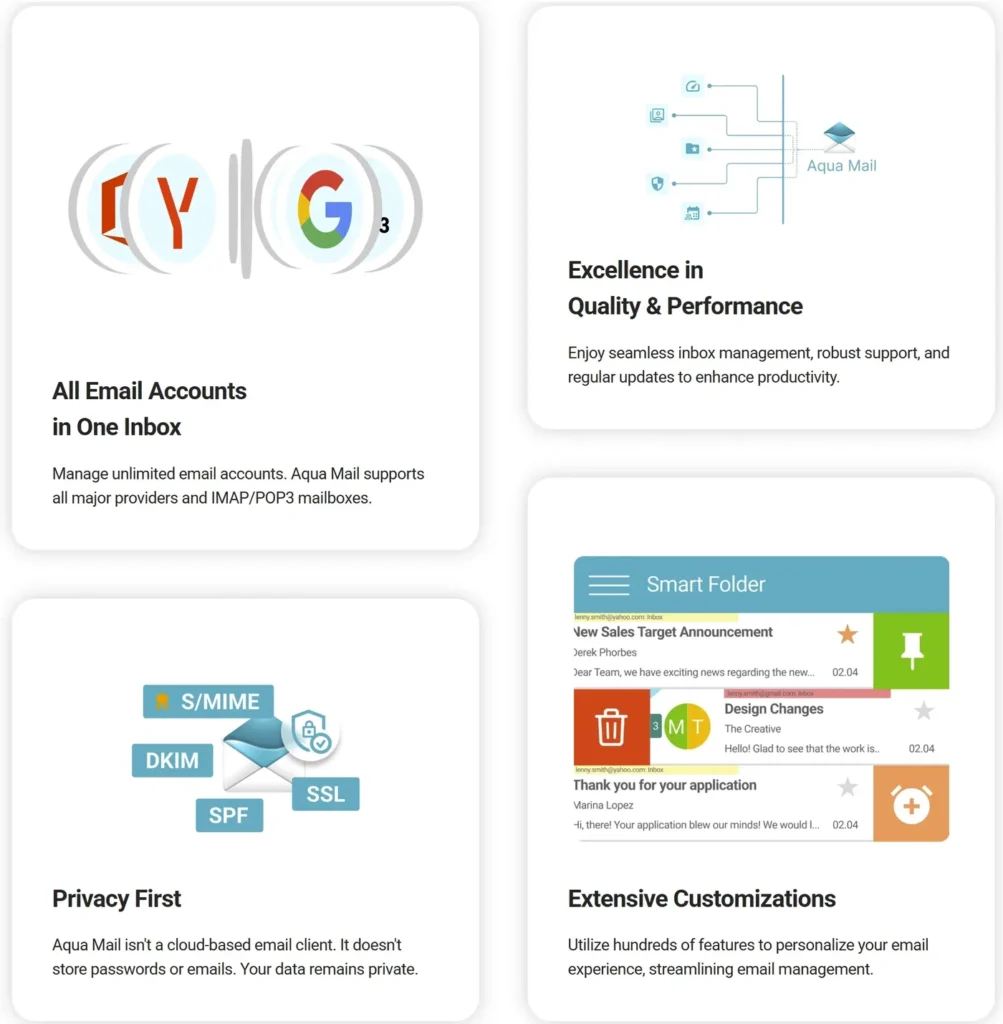
Aqua Mail allows you to view and manage multiple email accounts in one place. Instead of switching between apps or logging in separately, all messages are centralized in a single view, which reduces switching time and improves response speed across conversations.
Folder and Label Management
It gives you full control over how your emails are organized. You can sort messages into folders or apply labels based on priority, category, or workflow. This improves inbox clarity and reduces cognitive load when managing high email volume.
Multiple Account Support
Aqua Mail supports a wide range of email providers, allowing users to connect personal, work, and business accounts. This ensures all communication streams remain accessible without fragmentation.
Custom Email Signatures
Users can create and assign different signatures per account. This helps maintain professional consistency while separating personal and business communication clearly.
Push Notifications
The app provides real-time alerts for new emails so users can respond faster. Notification controls also help reduce distractions by prioritizing important messages only.
Cloud Storage Integration
Aqua Mail connects with cloud services for easier file sharing and attachment handling. This reduces dependency on device storage and improves workflow efficiency.
Customizable Interface and Gestures
Users can personalize swipe actions, layout styles, and navigation settings. This speeds up everyday actions like archiving, deleting, or marking emails.
Backup and Restore Options
Settings and configurations can be saved and restored across devices, ensuring consistent setup even when switching phones.
Advanced Features of Aqua Mail
Aqua Mail also includes advanced tools for users who need deeper control over email communication and security.
It supports IMAP and Exchange accounts, making it suitable for both personal and business environments. It also includes encryption options for users handling sensitive communication.
Widgets allow quick inbox access, while customizable swipe actions improve speed in message handling. Backup and restore functionality ensures users can migrate setups across devices without losing configuration.
These features make Aqua Mail a strong fit for users who need more than a basic email app but still want a mobile-first experience.
Customizations in Aqua Mail
Aqua Mail stands out for its deep customization options, allowing users to shape the app according to personal workflow needs.
Users can adjust themes, layouts, notifications, and gesture controls to match their preferred email behavior. This reduces friction and improves daily efficiency.
It also supports multiple identities per account, making it easier to manage different communication styles from a single email address.
How does Aqua Mail improve productivity?
Aqua Mail improves productivity by turning fragmented email management into a structured, centralized workflow. Instead of switching between apps or losing track of messages, users operate from a single organized environment.
One key improvement is centralized inbox access. When all accounts are visible in one place, users spend less time navigating between platforms and more time responding to messages. This creates a smoother and faster communication cycle.
Aqua Mail also improves productivity through smarter organization tools. Features like folders, labels, and swipe actions help users quickly sort and prioritize messages without interrupting workflow.
Research from McKinsey shows that professionals spend nearly 28% of their workweek managing email.
This reinforces why structured email tools are essential in modern workflows. Efficient email handling is also critical in broader communication and conversion workflows, especially when paired with structured email strategies used in marketing systems, where optimized messaging directly impacts engagement and response rates.
It also reduces distractions through customizable notifications and account switching, allowing users to respond from the correct identity instantly while maintaining focus.
When should you use Aqua Mail?
Aqua Mail should be used when you manage multiple email accounts and need a structured, mobile-first inbox system for daily communication.
It is especially useful for users who operate both personal and professional accounts on the same device and need clear separation between them.
It is also ideal for users who handle high email volume and need faster ways to sort, prioritize, and respond to messages.
Key Benefits of Aqua Mail
Aqua Mail delivers practical advantages for users who need more control and efficiency in managing email communication.
One major benefit is centralized email management, allowing users to access all inboxes in one interface without switching apps.
It also offers high customization flexibility, enabling users to adjust layouts, notifications, gestures, and inbox structure based on workflow preferences.
Another benefit is strong multi-provider support, including IMAP, Exchange, and popular email services.
Aqua Mail also improves workflow efficiency, reducing time spent organizing emails and increasing time spent responding. This type of streamlined communication also aligns with modern automation systems designed to scale messaging efficiency across platforms, as seen in email automation tools for scaling campaigns, where structured workflows help teams handle higher communication volume without losing consistency.
For teams looking to improve broader workflow efficiency beyond email systems, structured operational tools also play a major role.
How to set up Aqua Mail quickly
- Install Aqua Mail from your app store
- Add your email account (Gmail, Outlook, Yahoo, etc)
- Enable sync and notification preferences
- Customize folders, gestures, and inbox layout.
This setup process allows users to start managing emails efficiently within minutes.
FAQ: Aqua Mail
What is Aqua Mail used for?
Aqua Mail is used for managing multiple email accounts in one app with strong customization and organization features.
Is Aqua Mail better than default email apps?
Aqua Mail is better than most default email apps for users who manage multiple accounts because it offers unified inbox control, deeper customization, and better workflow flexibility.
Does Aqua Mail support multiple accounts?
Yes, it supports multiple accounts in a single unified inbox for easier management.
Does Aqua Mail work offline?
Yes, Aqua Mail allows offline access to previously synced emails and lets users draft messages without an internet connection.
Is Aqua Mail secure for email communication?
Yes, it supports IMAP, Exchange, and encryption options for secure communication.
Can Aqua Mail be used on multiple devices?
Yes, backup and restore features allow users to transfer settings across devices easily.
Final Verdict: Is Aqua Mail worth it?
Aqua Mail is a powerful email application built for users who want flexibility, control, and multi-account management in one place.
It is especially valuable for users who handle high email volume and need better organization tools than standard email apps provide. With strong customization options and reliable performance, Aqua Mail stands out as a practical solution for mobile email management.
For users looking for a simple yet powerful email client, Aqua Mail delivers a balanced mix of usability and advanced features that improve daily communication efficiency.
Try Aqua Mail for free to experience its unified inbox, customization tools, and productivity features firsthand, and see how it simplifies managing multiple email accounts in one app.

We research and organize marketing software around practical use cases. Product claims are included only when supported by available sources.
Read our editorial policy →Related guides

Black Friday Tracking Blind Spots: How Cookie Consent Affects Marketing Data and Attribution
Black Friday tracking blind spots can make campaign performance harder to interpret at exactly the time marketers need reliable data most. Ecommerce brands may see orders and leads increasing while analytics, advertising platforms, and other marketing systems provide an incomplete picture of which campaigns actually influenced those conversions. That doesn’t necessarily mean something is broken. […]

Online Store Launch Checklist: From Product Idea to First Order
Prepare your first online store with a practical checklist for products, checkout, delivery, order testing and a focused customer-acquisition plan.

How to Outsource Content Creation Without Losing Your Brand Voice
Learning how to outsource content creation can solve one of the biggest problems in content marketing: there is always more content to create than there is time to create it. Blog posts need writing, landing pages need updating, emails need preparing, and social channels need a steady supply of useful material. But handing the work […]