
This article may contain affiliate links. We may earn a commission at no additional cost to you; this does not determine our editorial conclusions.
Scalability issues in event registration platforms can cause system crashes, overselling, and data delays, leading to lost revenue and damaged reputations. Here’s a quick breakdown of the main challenges and solutions:
Key Challenges:
- Traffic Spikes: Platforms often crash or slow down during high-demand periods like early-bird registration.
- Overselling: Static capacity tracking leads to logistical problems when too many registrations are confirmed.
- Complex Forms: Lengthy or poorly designed registration forms drive high abandonment rates, especially on mobile.
- Integration Delays: Syncing data to CRMs or payment systems can take 5–30 minutes, causing missed opportunities.
- Inflexible Features: Basic platforms struggle with multi-day events or nuanced attendee states (e.g., waitlisted, canceled).
Solutions:
- Cloud Infrastructure: Use scalable cloud services like AWS EC2 Auto Scaling to handle traffic surges.
- Real-Time Updates: Implement systems with real-time capacity tracking to prevent overselling.
- Mobile Optimization: Simplify forms with conditional logic and ensure they’re mobile-friendly.
- Automation: Automate waitlist management and attendee communications to save time.
- Advanced Features: Opt for platforms with multi-event tracking, relational data structures, and open APIs for seamless integrations.
By addressing these challenges, you can reduce manual workloads, minimize errors, and improve attendee experiences while scaling your events effectively.
Common Scalability Problems in Event Registration
Traffic Spikes and Performance Problems
Platforms designed for smaller events often falter when faced with a sudden surge in traffic. For example, during early-bird registration periods or after a major promotional email, the influx of users can overwhelm the system. This can lead to slow performance or even crashes, leaving potential attendees locked out of the process. Another common issue is overselling. When multiple users submit forms simultaneously, basic systems with static capacity tracking may confirm more registrations than there are spots available, creating a logistical nightmare.
Payment processing adds another layer of difficulty. Even a small percentage of failed transactions can result in significant revenue loss when scaled up. Attendees who think they’ve secured their spot may discover otherwise, adding to their frustration. Integration delays exacerbate these problems. Many platforms sync with CRMs like HubSpot or Salesforce at set intervals – often every 15 minutes. By the time sales teams receive lead data, they may have already missed the optimal window to engage with attendees. As Accelevents aptly states, “At high volume, performance is not a nice-to-have”.
Complicated Registration Processes
Overly complex registration forms can deter potential attendees. Forms that ask unnecessary questions or fail to use proper conditional logic to simplify the process often lead to abandonment. This is especially problematic on mobile devices, where over 60% of registrations take place. High abandonment rates not only reduce attendance but also generate more support tickets, adding extra strain to event teams.
On the backend, these systems create additional challenges. Manual workarounds become necessary when platforms overwrite contact properties with each new registration, erasing historical data. This makes it nearly impossible to track attendees across multiple events. These inefficiencies, combined with a lack of flexibility, make it harder to manage more complex event setups.
Inflexible Features for Large Events
Platforms built for simpler events often struggle to handle the demands of large-scale or multi-day events. Features like multi-track agendas, exhibit hall floor plans, or customizable badge printing are often absent in rigid systems. Many platforms also fail to account for nuanced registration states, such as waitlisted, canceled, or no-show attendees, limiting the ability to send tailored communications.
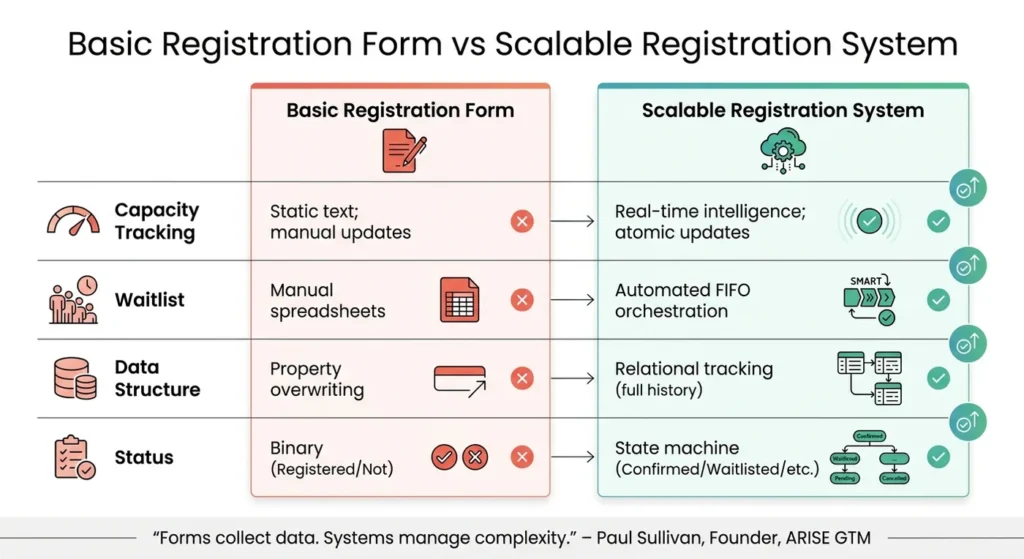
A lack of real-time capacity tracking forces event teams into what Paul Sullivan calls “manual theatre.” Staff must rely on spreadsheets to manage waitlists and manually route attendees, which is both time-consuming and error-prone. Sullivan explains, “Registration forms break at 30+ events/year when static capacity tracking causes overselling, waitlist management becomes manual spreadsheets, and multi-event tracking collapses”. Without systems that maintain complete attendee histories through relational data structures, scaling beyond a limited number of events becomes nearly impossible.
sbb-itb-645e3f7
How to Simplify Event Registration Without Losing Data
Solutions to Scalability Problems
Cloud Infrastructure for Traffic Management
Cloud platforms are a game-changer when it comes to handling sudden traffic spikes. Services like AWS EC2 Auto Scaling use machine learning to adjust server capacity on the fly. Whether it’s the end of early bird pricing or a major email blast, these systems step in to prevent crashes and slow loading times.
Serverless options, such as AWS Lambda or Azure Functions, take it a step further by managing resources automatically and charging only for the time your code runs. Add in caching tools like Cloudflare or Fastly, which serve static content from nearby locations, and you significantly reduce the strain on your servers.
Before launch, it’s crucial to run load tests to confirm your system can handle the demand. Tools like CAPTCHA can also help by keeping bots from bogging down your registration pages. And for extra peace of mind, real-time monitoring services like Sentry or New Relic send instant alerts when errors crop up, giving you a chance to fix problems before they spiral out of control. Together, these solutions create a more stable and user-friendly registration process.
Simplified and Mobile-Friendly Registration
With over 60% of event registrations now happening on mobile devices, mobile optimization is a must. Registration forms should be responsive and use conditional logic to display only the questions that matter to each user, cutting down on frustration and drop-offs.
Automating waitlist management can save event teams a ton of time. When someone cancels, the system automatically moves the next person up and sends a confirmation email – all without human involvement. This kind of automation and quality content marketing tools can free up 90 to 150 hours annually. Another smart move is opening registration in phases or waves. This approach spreads out demand, reduces system strain, and gives you time to troubleshoot between ticket releases.
Customizable Platform Features
Beyond technical upgrades, customizable features allow your system to meet the unique demands of different events. Scalable platforms can handle multiple registration states – like Confirmed, Waitlisted, or Canceled – and automate personalized communications for each status. For example, someone on the waitlist might get a message when a spot opens up, while confirmed attendees receive event reminders.
If you’re managing dozens of events annually, platforms with unlimited entities – no caps on events, users, or custom fields – can help you avoid growth roadblocks. And with open APIs and webhooks, integrations with CRMs or payment processors happen seamlessly. This eliminates frustrating sync delays that could cause sales teams to miss out on peak interest periods.
“Forms collect data. Systems manage complexity.”
– Paul Sullivan, Founder, ARISE GTM
| Capability | Basic Registration Form | Scalable Registration System |
|---|---|---|
| Capacity Tracking | Static text; manual updates | Real-time intelligence; atomic updates |
| Waitlist | Manual spreadsheets | Automated FIFO orchestration |
| Data Structure | Property overwriting | Relational tracking (full history) |
| Status | Binary (Registered/Not) | State machine (Confirmed/Waitlisted/etc.) |
Integration and Data Management for Scalability
CRM and Payment Gateway Integration
Managing data for thousands of registrations can quickly become a logistical nightmare. Teams handling 30+ events annually often spend 6–10 hours per week on manual reconciliation, adding up to a staggering $31,200–$52,000 in yearly costs. Without proper integration, manual errors – like duplicate entries or missed updates – become all too common.
To tackle these issues, prioritize platforms with open APIs and webhooks that sync registration data directly with your CRM, marketing automation tools, and payment processors. External platforms often introduce sync delays of 5–30 minutes, which can lead to duplicate communications or missed follow-ups. In contrast, systems with native architecture record data directly into the CRM, cutting response times by an average of 18 minutes per registration. This direct integration ensures smoother workflows and preserves complete attendee histories.
Another critical feature is relational data structures. These systems track multiple registrations per contact, maintaining a detailed record of each attendee’s journey. On the financial side, payment gateways with fraud detection and support for multiple payment methods – like purchase orders and digital wallets – can automate invoicing, refunds, and tax calculations, making it easier to handle thousands of transactions without breaking a sweat.
Multi-Currency and Regional Tax Support
For global events, managing financial regulations across regions is no small feat. Multi-currency and regional tax support can significantly reduce administrative burdens. Payment automation, for instance, cuts manual tasks by 45% and reduces errors to under 0.2%. Organizations using automated reconciliation also report an average 18% drop in financial discrepancies.
Advanced pricing engines and regional tax calculators simplify international transactions by dynamically adjusting ticket prices and generating compliant invoices. These tools even handle stackable discounts, ensuring smooth operations across different currencies. Additionally, staying PCI DSS compliant is a must when processing international payments, as non-compliance can result in penalties ranging from $5,000 to $50,000 per incident.
How to Choose a Scalable Event Registration Platform
Features to Prioritize
When selecting an event registration platform, scalability should be at the top of your checklist. Look for a cloud-based platform with auto-scaling infrastructure. This ensures the system can handle sudden spikes in traffic, like early-bird registration launches, without crashing. Platforms that adjust server capacity dynamically during high-demand moments are a must for seamless operations.
Another critical feature is real-time capacity tracking. This prevents overselling by monitoring availability across all events in real time. Platforms using atomic operations can instantly confirm registrations or move attendees to waitlists. Without this, event teams managing 30–50 events annually could spend 6–8 hours a week on manual capacity checks, racking up operational costs between $31,200 and $41,600 per year.
Integration capabilities are equally important. Choose platforms with open APIs and webhooks that sync instantly with your CRM and marketing tools. Native CRM integration eliminates delays and ensures smooth data flow. During vendor demos, test this by pushing a registration into your CRM to verify how quickly and accurately the data transfers.
Don’t overlook compliance and data management. Ensure the platform supports role-based permissions, audit trails, and consent management to meet GDPR and UK regulatory requirements. Additionally, ask about the vendor’s “exit strategy” to confirm you can easily export historical data and custom fields if you decide to switch platforms later on.
Once you’ve identified these key features, use curated directories to narrow down your search and find the right platform.
Using Directories to Find Scalable Tools
Curated directories can save you time when searching for scalable event registration platforms. For example, Content and Marketing (https://content-and-marketing.com) offers a directory of tools tailored to organizers looking for scalable solutions.
For enterprise-level requirements, resources like the Gartner Magic Quadrant highlight industry leaders and innovators, helping you make informed decisions. Additionally, user review platforms like G2 provide practical insights from event professionals. For instance, Zuddl, an AI-powered B2B event platform, boasts an impressive 4.8/5 rating on G2. If you’re focused on the UK and Europe, the Event Tech Live exhibitor directory is a valuable resource for finding regional specialists.
When evaluating platforms, prioritize those that have undergone rigorous load testing and offer uptime SLAs of at least 99.5% during high-traffic periods. This ensures the platform can handle peak usage without disruptions.
Conclusion
Scalability issues in event registration platforms can seriously undermine your events. As Paul Sullivan from ARISE GTM points out, an effective registration system does much more than just collect attendee information – it’s a cornerstone of operational success. For teams managing 30–50 events annually, the burden of manual capacity management can add up to 6–10 hours each week.
The challenges only grow as your event calendar fills up. Traffic surges, manual adjustments, delays in system integrations, and onsite check-in bottlenecks can quickly spiral out of control. What might take 20 minutes to address during your fifth event could balloon to two hours by the time you’re managing your 30th, especially if your platform isn’t equipped to handle increasing complexity.
To tackle these issues, upgrading to a more advanced registration platform is essential. Look for systems with cloud-based auto-scaling, real-time capacity tracking, and native CRM integrations. These features eliminate common pain points like syncing delays and overselling, while also reducing the need for constant manual oversight.
When assessing platforms, keep in mind that scalability should encompass the entire registration process – from the moment attendees sign up to their onsite check-in experience. As VenueSight aptly puts it:
“Large conferences don’t fail because of marketing. They fail operationally.”
Ultimately, the right platform should empower your growth, not hold it back. Use the tools and strategies highlighted in this article to find a registration system capable of handling your largest events with ease. Your platform should simplify operations, freeing you to focus on delivering exceptional event experiences.
FAQs
How can I estimate peak registration traffic before launch?
To gauge peak registration traffic, start by examining historical data from comparable events. Look at patterns influenced by factors like marketing efforts, the event’s overall appeal, and timing. Pay attention to early indicators, such as pre-registration numbers or the volume of inquiries, as these can provide valuable clues about upcoming demand. Additionally, running load tests or simulations tailored to your platform’s capacity can help you anticipate traffic spikes and ensure your system is ready to manage them efficiently.
What’s the safest way to prevent overselling in real time?
The best way to avoid overselling in real time is by leveraging dynamic capacity tracking combined with real-time inventory management. These tools automatically halt registrations as soon as the event reaches its capacity, ensuring you don’t sell more spots than are actually available.
How can I confirm CRM and payment data sync instantly?
To make sure your data syncs instantly, connect your payment processor directly to your CRM using secure APIs or webhooks. Look for a platform that offers real-time updates, supports multiple currencies, and includes reconciliation tools. This setup ensures that payment and registration details move effortlessly between systems, cutting down on errors and keeping your attendee and financial records accurate. With real-time syncing, you’ll get immediate updates on payment statuses and attendee info, making event management much smoother.
Related Blog Posts

We research and organize marketing software around practical use cases. Product claims are included only when supported by available sources.
Read our editorial policy →Related guides
AI Marketing Video QA: A Pre-Publish Checklist for Small Teams
Check claims, product accuracy, permissions, captions and mobile readability before publishing an AI-assisted marketing video.
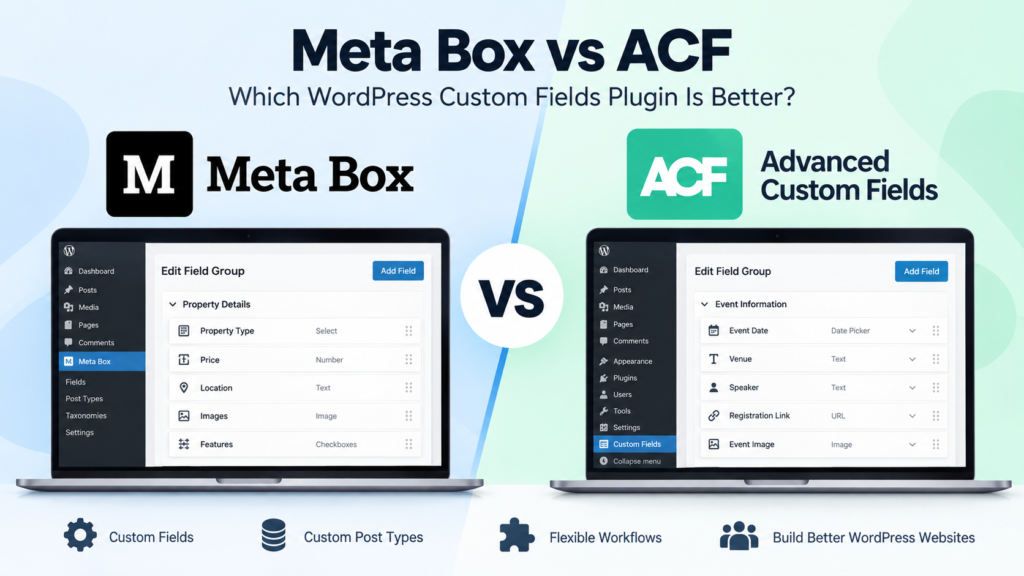
Meta Box vs ACF: Which WordPress Custom Fields Plugin Is Better in 2026?
Meta Box vs ACF is a common comparison when a WordPress website starts needing more flexibility than the standard post and page editor provides. Both plugins let you create custom fields, organize structured information, and build more dynamic WordPress websites without forcing everything into the main content editor. The differences become more important as the […]
Online Store Launch Checklist: From Product Idea to First Order
Prepare your first online store with a practical checklist for products, checkout, delivery, order testing and a focused customer-acquisition plan.