

This article may contain affiliate links. We may earn a commission at no additional cost to you; this does not determine our editorial conclusions.
This article contains affiliate links. If you sign up for HubSpot through these links, we may earn a commission at no additional cost to you.
HubSpot Knowledge Base improves customer support by enabling self-service, reducing ticket volume, and connecting CRM data with automation workflows. Businesses use it to deliver faster responses while maintaining consistency across all customer interactions.
Built into HubSpot Service Hub, HubSpot Knowledge Base allows companies to create a searchable library of FAQs, guides, and support content that customers can access anytime. This reduces support workload while improving response time and customer satisfaction.
Instead of relying only on agents, HubSpot’s platform empowers customers to solve problems independently. At the same time, it connects with HubSpot CRM, marketing automation, and support workflows to ensure every interaction is tracked and continuously improved.
Quick Answer: What Does HubSpot Knowledge Base Do?
• Enables self-service customer support
• Reduces repetitive support tickets
• Improves response time with automation
• Uses CRM data to personalize support
• Provides search insights to improve content
What Is HubSpot’s Knowledge Base and How Does It Work?
HubSpot’s Knowledge Base is a built-in feature of HubSpot Service Hub that allows businesses to create a centralized library of help articles, FAQs, and guides for customers.
It works by publishing searchable support content that customers can access anytime, giving them the ability to find answers without waiting for support. When integrated with HubSpot CRM, it connects customer interactions, behavior tracking, and support history into one unified system.
This connection gives support teams full visibility into what customers are searching for, what issues they encounter, and how they interact with help content. As a result, teams can respond faster and improve the overall support experience using real data.
Moreover, it also allows you to integrate the knowledge base into your automation workflows. For example, when a customer initiates a chat and asks a question, the platform can automatically suggest relevant knowledge base articles through chatbots or live chat prompts, helping resolve issues instantly before an agent steps in.
Overall, it functions as a powerful self-service tool that improves efficiency by handling frequently asked questions and common concerns automatically. At the same time, HubSpot provides search insights and reporting, including the most searched keywords, which helps you identify content gaps and create new knowledge base articles based on actual customer needs.
This creates a continuous improvement loop where your support content evolves alongside customer behavior, reducing ticket volume while delivering faster and more relevant answers.
Why Modern Customer Support Needs a Smarter System
Customer support today faces increasing pressure to deliver faster responses while maintaining high-quality experiences. Many teams struggle with repetitive inquiries that take time away from more complex issues, leading to slower response times and agent fatigue.
At the same time, customer data is often scattered across multiple tools, making it difficult for teams to understand context quickly. Without a clear view of customer behavior and history, responses become inconsistent, which negatively impacts trust and satisfaction.
Another major challenge is the lack of visibility into what customers actually need. Without insights into search behavior or common questions, businesses often create support content based on assumptions rather than real demand. This results in incomplete knowledge bases that fail to fully support users.
These challenges highlight the need for a system that not only centralizes information but also continuously improves based on real customer interactions.
How HubSpot Knowledge Base Solves These Challenges
HubSpot transforms frequently asked questions into structured self-service content. Instead of answering the same queries repeatedly, businesses can provide instant solutions through well-organized articles that customers can access anytime.
This significantly reduces ticket volume, especially for common issues like onboarding, billing questions, and troubleshooting. As more customers rely on self-service, support teams spend less time on repetitive tasks and more time resolving complex or high-value concerns that require human interaction.
Over time, this shift improves team productivity and allows businesses to scale support without increasing headcount.
HubSpot Knowledge Base Provides Data-Driven Support Insights
This feature tracks how users interact with support content, including the most searched keywords, article views, and engagement metrics. This gives businesses a clear understanding of what customers are trying to solve and where gaps exist in their current content.
Instead of relying on assumptions, teams can use real search data to prioritize which articles to create or improve. For example, if a specific feature or issue is frequently searched but not well documented, it becomes an immediate opportunity to enhance the knowledge base.
This data-driven approach aligns with how businesses improve user experience decisions using CRM insights, ensuring that support content continuously evolves based on actual customer behavior.
HubSpot Knowledge Base Improves Efficiency and Response Time
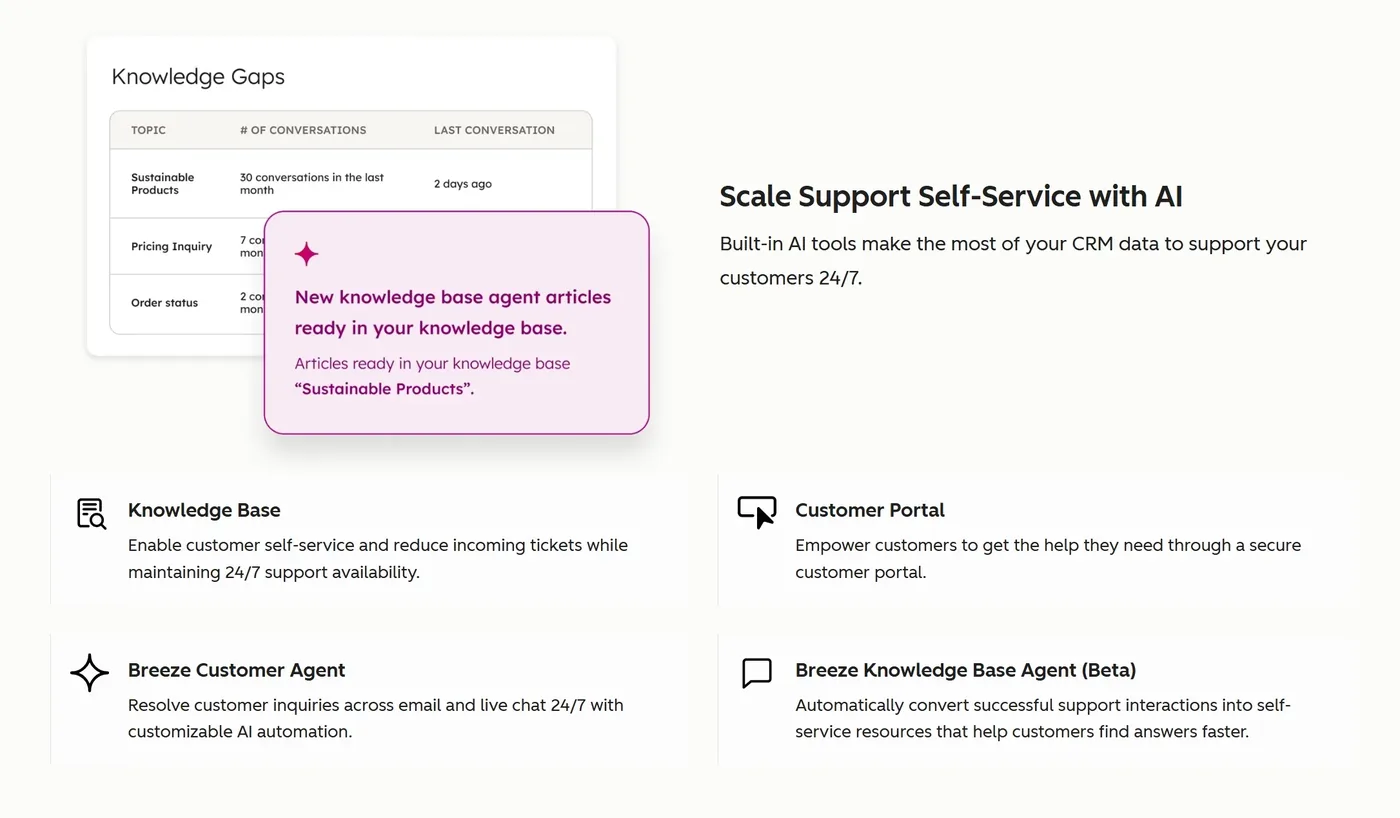
HubSpot connects knowledge base content with automation workflows, allowing businesses to respond faster without increasing workload. When a customer initiates a chat or submits a question, the system can automatically suggest relevant articles in real time.
This reduces the need for manual responses and allows customers to resolve issues instantly. If the suggested content does not fully solve the problem, the conversation can be escalated to a support agent with full context already available.
As a result, resolution times are shorter, support queues are reduced, and customers experience less friction. This reflects broader industry trends where companies using automation tools report measurable improvements in efficiency and ROI.
In addition, research shows that companies implementing self-service support options can reduce support costs by up to 30% while improving customer satisfaction, reinforcing the value of knowledge base systems.
HubSpot Knowledge Base Supports Loop Marketing and Growth
The platform’s Knowledge Base connects support data with marketing and sales strategies through loop marketing, creating a continuous feedback cycle across teams. Insights from knowledge base usage, such as common questions and pain points, can be used to improve onboarding flows, marketing content, and product messaging.
For example, if customers frequently search for a specific feature, marketing teams can create targeted content to explain it better, while product teams can improve usability. This alignment ensures that customer feedback is not siloed within support but is used to drive broader business improvements.
This approach works effectively when combined with structured content strategies, allowing businesses to turn support insights into growth opportunities.
Step-by-Step: How to Set Up HubSpot Knowledge Base
Understanding how the platform’s Knowledge Base improves customer support is only the first step. The real impact comes from implementing it in a structured and scalable way.
HubSpot provides built-in tools within Service Hub that guide you from setup to optimization.
- Access your HubSpot dashboard and open Service Hub
- Navigate to the Knowledge Base tool
- Create categories such as onboarding, billing, and FAQs
- Write clear and simple support articles
- Enable search, feedback, and analytics
- Connect workflows to automate responses
- Promote content using HubSpot Marketing Hub
This process ensures your knowledge base evolves into a dynamic support system that improves over time.
HubSpot Knowledge Base vs Other Customer Support Tools
| Feature | HubSpot Knowledge Base | Zendesk | Freshdesk | Intercom |
|---|---|---|---|---|
| CRM Integration | Native HubSpot CRM | Limited | Limited | Partial |
| Marketing Automation | Built-in | No | No | Limited |
| Self-Service Knowledge Base | Yes | Yes | Yes | Yes |
| Automation Workflows | Advanced | Moderate | Moderate | Advanced |
| Unified Platform | Yes | No | No | No |
HubSpot stands out because it combines CRM software, marketing automation, and customer support into one platform.
FAQ: HubSpot Knowledge Base
What is the measurable impact of using HubSpot Knowledge Base?
The key benefits of HubSpot Knowledge Base are measurable and directly tied to business performance.
Businesses can significantly reduce support ticket volume by enabling customers to find answers on their own through self-service content. Response times improve because automation handles repetitive inquiries and routes complex issues more efficiently.
Operational costs decrease while customer satisfaction increases due to faster and more accurate responses. Over time, this leads to improved retention and a stronger overall customer experience.
When should you use HubSpot Knowledge Base?
HubSpot Knowledge Base is ideal when your business handles repetitive support questions and needs a scalable solution.
It is especially useful when you want to reduce dependency on manual support and improve customer experience. Businesses in SaaS, e-commerce, and service industries benefit the most.
How does HubSpot compare to competitors in terms of knowledge base?
HubSpot Knowledge Base compares to competitors by offering a fully integrated self-service system that connects CRM data, automation, and customer support in one platform. Unlike standalone tools, it connects knowledge base content with workflows and customer data. This allows businesses to deliver faster and more personalized support experiences.
Platforms like Zendesk offer strong support features, but often require integrations to match HubSpot’s all-in-one functionality.
How difficult is it to set up HubSpot Knowledge Base?
Setting up is straightforward and does not require technical skills. Most businesses can launch a basic version within a few hours.
Is knowledge base included in all customer support platforms?
Not all support platforms include a built-in knowledge base. Some require third-party tools, which can add complexity.
Platforms like HubSpot include it natively, allowing better integration and efficiency.
Is HubSpot Knowledge Base free?
While the platform offers a free CRM, advanced Knowledge Base features are part of paid Service Hub plans.
What features does HubSpot Knowledge Base include?
Features include article creation, search functionality, analytics, automation workflows, and CRM integration.
Final Thoughts
HubSpot Knowledge Base is more than just a support tool. It connects self-service, CRM, and automation to improve customer support at scale.
By reducing repetitive tasks and improving response time, businesses can deliver better experiences without increasing operational costs.
If your team is struggling with high ticket volume or inefficient workflows, HubSpot provides a practical and scalable solution.
Try HubSpot CRM for free and start reducing support tickets while improving customer experience today.

We research and organize marketing software around practical use cases. Product claims are included only when supported by available sources.
Read our editorial policy →Related guides

Black Friday Tracking Blind Spots: How Cookie Consent Affects Marketing Data and Attribution
Black Friday tracking blind spots can make campaign performance harder to interpret at exactly the time marketers need reliable data most. Ecommerce brands may see orders and leads increasing while analytics, advertising platforms, and other marketing systems provide an incomplete picture of which campaigns actually influenced those conversions. That doesn’t necessarily mean something is broken. […]

AI Marketing Video QA: A Pre-Publish Checklist for Small Teams
Check claims, product accuracy, permissions, captions and mobile readability before publishing an AI-assisted marketing video.
Meta Box vs ACF: Which WordPress Custom Fields Plugin Is Better in 2026?
Meta Box vs ACF is a common comparison when a WordPress website starts needing more flexibility than the standard post and page editor provides. Both plugins let you create custom fields, organize structured information, and build more dynamic WordPress websites without forcing everything into the main content editor. The differences become more important as the […]