A/B testing is a simple yet powerful way to improve landing page performance. By comparing two webpage versions - one original and one with a specific change - you use real data to determine what works best. This method helps you make informed decisions, leading to higher conversions without increasing traffic.
Key takeaways:
- What to Test: Headlines, CTA buttons, and forms are the most impactful elements to optimize.
- Why It Matters: Even small tweaks, like changing a headline or simplifying a form, can significantly boost conversions (e.g., a 45% increase in orders or 112% more signups).
- How to Do It: Test one variable at a time, split traffic evenly, and wait for statistically significant results before making changes.
A/B testing is a data-driven approach to improving your landing page's effectiveness, helping you get more results from the same audience.
Master landing page A/B testing for higher conversions
Key Elements to Test on Landing Pages
When it comes to landing pages, a few key elements - headlines, CTA buttons, and forms - play a huge role in driving conversions. These components are your MVPs, directly influencing whether visitors take action or leave. By systematically testing these elements, you can achieve noticeable performance improvements without overhauling the entire page. Each tweak you make can have a direct impact on boosting conversions.
Headlines and Subheadings
Headlines are your first impression. They set the stage for everything that follows, and a weak headline can lose visitors before they even scroll. For example, OptiMonk tested headlines and saw a 45% increase in orders, a result that was both statistically reliable and consistent over time.
To optimize your headlines, try comparing benefit-focused copy to feature-focused copy while keeping everything else the same. Even small changes in tone or emphasis can make a big difference in how visitors engage with your page.
Call-to-Action (CTA) Buttons
Your CTA button is where curiosity turns into action. Details like color, text, size, and placement can all influence click-through rates. For instance, testing variations such as "Start Free Trial" versus "Sign Up" or red buttons versus green ones can help pinpoint what resonates most with your audience. The goal is to make your CTA stand out while clearly communicating its value.
When testing, focus on one aspect at a time - whether it’s color, text, or placement. Testing multiple changes simultaneously makes it hard to identify what’s driving results. Prioritize action-oriented language and position your CTA prominently, ideally above the fold.
Forms and Input Fields
Forms often act as barriers. The more fields you ask users to fill out, the higher the likelihood they’ll drop off. Simplifying forms - like cutting optional fields or reducing the overall number of fields - has been shown to boost conversions by as much as 112% and improve signup rates from as low as 3%.
Experiment with form length, layout (single-step versus multi-step), and field types. For example, multi-step forms can make longer forms feel less overwhelming by breaking them into smaller, more digestible sections. Track completion rates to measure success, and don’t hesitate to eliminate fields that aren’t essential for your sales or follow-up process. Every adjustment you make should aim to reduce friction and make the experience smoother for users.
How to Run an A/B Test: Step-by-Step
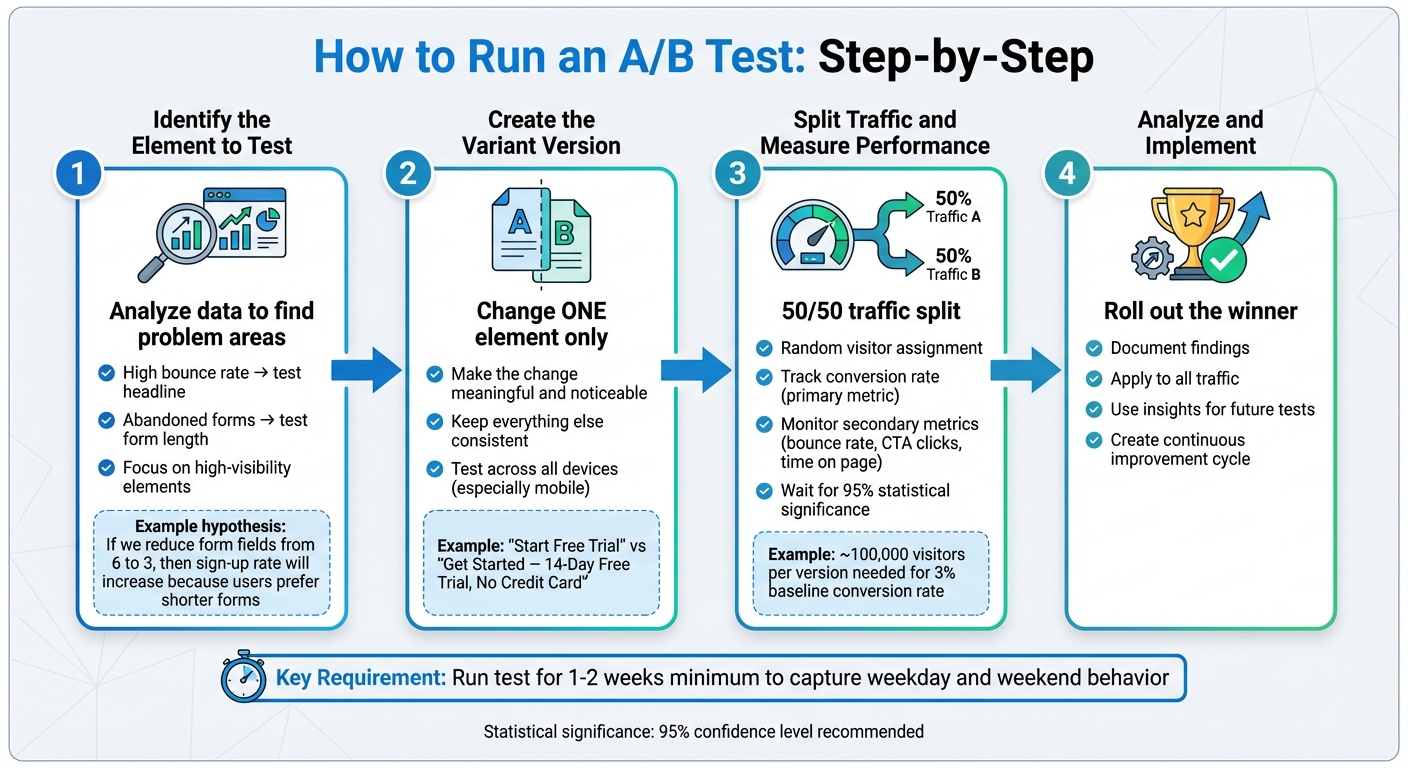
A/B Testing Process: 4-Step Guide to Improve Landing Page Conversions
Running an A/B test can be straightforward if you follow a structured process: choose one element to test, create a variation, split your traffic evenly, and analyze the results. The key is to test one variable at a time and wait for results that are statistically reliable.
Identify the Element to Test
Start by diving into your analytics to identify problem areas. For example, a high bounce rate might indicate issues with your headline, while abandoned forms could suggest friction in the input process. Focus on elements that are highly visible and directly linked to conversions, such as your headline, call-to-action (CTA) button, or form length. These are often the areas where small changes can make a big difference.
Before testing, craft a clear hypothesis. Use a simple structure like this:
"If we change [element] from [current state] to [new state], then [metric] will improve because [reason]."
For example:
"If we reduce the free trial form from six fields to three, then the sign-up rate will increase because U.S. mobile users prefer shorter forms."
This approach not only keeps you focused but also sets a clear goal - whether that’s more sign-ups, purchases, or clicks on your CTA.
Create the Variant Version
When designing your test, make sure the variant differs from the original in one clear and meaningful way. For instance, if you’re testing a headline, avoid simultaneously tweaking button colors or images. The change should be noticeable enough to impact user behavior - for example, changing "Start Free Trial" to "Get Started – 14-Day Free Trial, No Credit Card" is a meaningful test. On the other hand, minor tweaks like adding "Now" to "Sign Up" may not yield actionable insights.
Keep everything else consistent between the original and the variant. That means the same tracking setup, form integrations, and page speed. Test the variant thoroughly across devices - especially mobile - to ensure it functions smoothly before you launch.
Split Traffic and Measure Performance
Use an A/B testing tool or landing page platform to randomly assign visitors to either the original (version A) or the variant (version B). A 50/50 split is standard and ensures both versions get a similar mix of traffic sources, whether it’s from Google Ads, social media, or organic search. Avoid manually routing traffic unless your tool accounts for channel differences, as uneven distribution can skew your results.
Track your primary metric - usually the conversion rate (conversions divided by total visitors) - alongside secondary metrics like bounce rate, CTA clicks, and time spent on the page. Keep the test running until you’ve collected enough data to reach statistical significance, typically 95%. For example, if your landing page converts at 3%, you might need approximately 100,000 visitors per version to detect a 20% improvement with confidence. Testing can take weeks depending on your traffic levels, so don’t rush to conclusions based on early results, as these can fluctuate significantly before stabilizing.
Once you’ve identified a statistically supported winner, roll it out to all your traffic and document your findings. Use these insights to inform future tests, creating a continuous improvement cycle that boosts your conversion rates over time. With a clear winner in place, you’re ready to integrate these learnings into your broader optimization efforts.
sbb-itb-645e3f7
Best Practices for A/B Testing
A/B testing can be a game-changer - when done right. By following a few core principles, you can ensure your tests provide reliable insights instead of wasting time and money. These practices help safeguard your ad spend and confirm that any boost in conversions is genuine, not just a fluke. Here's how to make sure your A/B tests deliver actionable results.
Use a Large Enough Sample Size
Before starting a test, it’s crucial to calculate the number of visitors you’ll need to achieve meaningful results. This depends on your baseline conversion rate and the level of improvement you’re aiming for. For example, if your landing page currently converts at 3% and you want to detect a 20% improvement (from 3.0% to 3.6%), you’ll require about 100,000 visitors per variant to meet standard confidence levels (95% significance, 80% power).
If your page receives 20,000 sessions per week and you split traffic evenly, that’s 10,000 sessions per variant weekly. In this case, your test would need to run for about 10 weeks to gather enough data.
For paid traffic, this could mean a hefty investment. If you’re working with limited traffic, prioritize testing high-impact elements like headlines or your primary call-to-action (CTA), where even smaller sample sizes can reveal meaningful insights. Alternatively, you can temporarily increase your ad budget or combine traffic sources (like organic, paid search, and social) to hit your target volume faster.
Test One Variable at a Time
When running an A/B test, focus on changing just one element - like a headline, CTA button, or form length - so you can directly connect any performance shifts to that specific change. For instance, testing "Start your free 14-day trial" against "Try our platform free for 14 days – no credit card required" ensures you’ll know which message resonates better.
Steer clear of testing multiple changes at once. If you adjust the headline, hero image, button color, and form fields simultaneously, even a 100% conversion increase won’t tell you which change made the difference. If you need to test multiple variables, consider using multivariate testing. Just keep in mind that multivariate tests require significantly more traffic and a more complex setup.
Run Tests for an Appropriate Duration
To get accurate results, your test should run for at least one full week, preferably two. This ensures you capture both weekday and weekend behavior, as user activity and purchase patterns often differ between Monday–Friday and Saturday–Sunday in the U.S..
Keep the test running until your results stabilize. Early fluctuations are common, so it’s essential to wait until you’ve hit your minimum sample size, conversion count, and statistical significance. For example, if you need 30,000 visitors per variant and your page attracts 5,000 visitors daily, plan to run the test for about 12 days, which also spans at least one weekend.
Avoid running tests during major U.S. holidays or big sales events like Black Friday unless you’re specifically testing for those periods. These events can temporarily skew traffic patterns and intent, leading to misleading results. By sticking to a disciplined timeline, you’ll avoid false positives and ensure your findings hold up when applied to your broader audience.
Conclusion
How A/B Testing Improves Conversions
A/B testing takes the guesswork out of decision-making by relying on data-backed insights to show what actually works. Whether it’s tweaking headlines, call-to-action buttons, forms, or layouts, this method reveals which changes lead to more sign-ups, leads, or sales. Instead of endless debates over design choices, you can let real-world data guide you. For instance, even a small improvement - like reducing mobile load time by 0.1 seconds - can boost conversions by 8.4% in retail and 10.1% in travel.
The benefits of A/B testing add up over time. It helps you achieve higher conversion rates without increasing traffic, reduces bounce rates by making pages more engaging, and maximizes the return on your ad spend. Regular testing can transform a landing page with an average 2–3% conversion rate into a top performer exceeding 10%. For example, if your conversion rate rises from 4% to 4.8%, U.S. businesses could see a 16.7% drop in cost per lead while keeping the same cost per click. With these clear advantages, it's time to dive into how you can set up your first A/B test.
Getting Started with A/B Testing
Begin with a landing page that already attracts a steady flow of traffic, whether from Google Ads, email campaigns, or social media. Define one specific goal - such as form submissions, demo requests, or purchases - and focus on testing a single element. This could be the headline, the copy on your CTA button, or the length of your form. Create a variant that changes only that one element, split your traffic evenly, and run the test for at least one to two weeks to account for both weekday and weekend behavior.
Today’s tools make this process easier than ever, offering features like visual editors, built-in split testing, and automatic performance tracking. If you need help selecting the right tools, Content and Marketing offers a directory of landing page builders, A/B testing platforms, AI-powered copywriting tools, and more to fit your goals and budget. By treating A/B testing as a continuous loop - measure, hypothesize, test, implement, and repeat - you’ll gain deeper insights into your audience and see steady improvements in your results over time.
FAQs
What are the key elements to focus on during A/B testing for landing pages?
To get the best results from A/B testing your landing pages, focus on tweaking elements that directly influence user behavior and conversions. Here are some key areas to test:
- Headlines: Play around with different wording, tones, or lengths to see which grabs attention most effectively.
- Calls-to-action (CTAs): Test variations in button text, colors, placement, and size to find what encourages clicks.
- Images and visuals: Compare different types of imagery or graphics to discover what resonates with your audience.
- Page layout and design: Experiment with how content is arranged, including spacing and navigation, to improve usability.
- Form fields: Adjust the number of fields, their order, and labels to minimize friction and boost submissions.
- Color schemes: Test how different colors affect mood and guide user focus on the page.
- Copy length: Try both concise and detailed text to determine the ideal balance for your audience.
By methodically testing these elements, you’ll uncover what drives better engagement and conversions, helping you design a landing page that truly connects with your visitors.
How can I tell if my A/B test results are statistically significant?
To determine whether your A/B test results hold statistical weight, focus on the p-value or the confidence level. A p-value below 0.05 or a confidence level of 95% typically suggests the results are significant.
Statistical methods like t-tests or chi-square tests can help you analyze and compare your variations effectively. However, ensure your sample size is sufficient to capture meaningful differences. Thankfully, many tools are available to automate these calculations, streamlining the process and reducing the risk of errors.
How can I run effective A/B tests if my website traffic is low?
If your website doesn't get much traffic, you can still run effective A/B tests by concentrating on key elements like headlines, call-to-action buttons, or main visuals. To ensure accurate results, extend the testing period to gather sufficient data. You can also rely on existing analytics or customer feedback to decide what to test first. This method allows you to make smarter choices, even with fewer visitors.